How to See What Ads a Competitor Runs on LinkedIn With AgentKey
Connect the LinkedIn Ad Library to your AI agent with AgentKey, pull one company's ads, and count products, offers, buttons, formats and run dates.
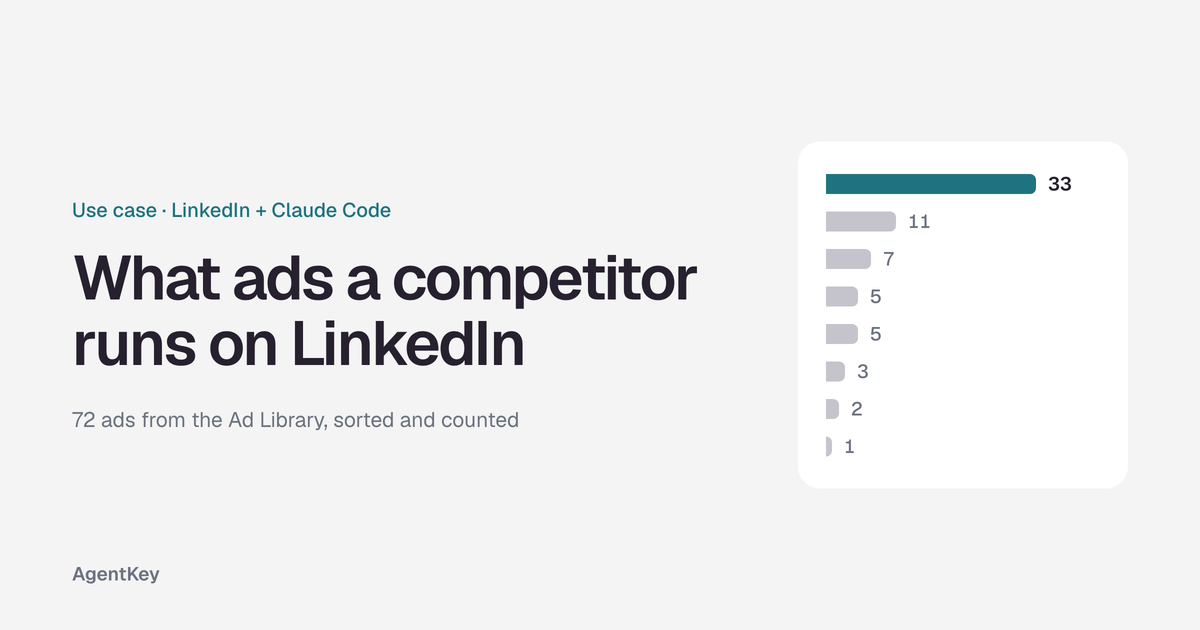
Get a counted picture of one company's LinkedIn ads: the products it pushes, what each ad asks the reader to do, the formats it uses, and run dates where LinkedIn discloses them. Connect AgentKey, then paste this into your agent:
Use AgentKey's LinkedIn Ad Search tool (AnyAPI/linkedin_ads_search) to show me what [COMPANY] advertises on LinkedIn. Check the listed price before the first paid call and add up credits_charged after every call. Stop and ask me if the total passes 2.4 credits or one call is charged more than 0.6. Retry a call that times out up to three times.

Search with company set to [COMPANY] and countries set to [COUNTRY CODE], then follow nextCursor with paginationToken twice: three pages of 24 ads. Then make one more call with countries set to [EU COUNTRY CODE]. Pass only company, countries, paginationToken and jq. On every call use this jq: .data | {total: .totalAds, next: .nextCursor, ads: [.ads[] | {id, adType, advertiser, page: .advertiserLinkedinPage, cta, headline, description, startDate, endDate, totalImpressions}]}

The search matches names, so group ads by advertiser page. Name the page that looks like the company's own, list the others, and keep blank-page rows as their own group. Report ads returned against the 72 and 24 requested, the total on each first page, whether any ad ID repeats, and how many ads per country carry a start date, an end date and an impression range.

For the company's own page in [COUNTRY CODE], count ads by button label (cta) and format (adType), and count distinct headlines. Give every ad one product or theme, groups created from the data, and one offer type judged from copy and button: demo request, guide download, event or webinar, free trial, product page with no stated offer, post with no button, or other. Give up to three example ad IDs each. For all [EU COUNTRY CODE] rows, count ads by button label and offer type, list start dates, end dates and impression ranges, and say which end dates are before today.

Paraphrase ad copy and headlines, and leave out people's names. The library shows no spend, clicks or leads, and an ad without dates may no longer be running, so do not call any ad a winner or live. Separate what the data shows from what you infer.
B2B paid-media and demand-generation leads look at a competitor's LinkedIn ads before they plan a quarter. LinkedIn's Ad Library is a page of cards, and a large advertiser has hundreds of them. Scrolling leaves you with an impression, not a count of offers.
An AI agent can do the counting, with one catch: in our test it could not open the Ad Library with its own tools. This guide shows how AgentKey supplies the ads. We ran every step on HubSpot's ads on November 24, 2026, and the numbers below come from that run.
AgentKey covers one part of the job. It returns the ads; your agent's model sorts them, and you check the result. The library shows no spend, clicks or leads, so nothing here says which ads perform.
At the end you will have:
- Counts of button labels, formats, products and offer types, with example ad IDs.
- A check on which ads come from the company's own page.
- Run dates and impression ranges for the ads that carry them.
- A record of the sample size, the date and what the run cost.
Why can't an AI agent read the LinkedIn Ad Library on its own?
In our test, LinkedIn refused the agent's built-in page fetch on every Ad Library address, and web search led only to third-party pages with a handful of ads and no button labels. A picture of paid messaging needs a list: each ad with its text, format, button and advertiser.
We asked Claude Code to get that with its built-in tools first. The page fetch failed on four addresses: the library's home page, a search by company name, a search by company ID and one ad's own page. All four answered HTTP 403 Forbidden.
Three web searches returned 45 links and no list of ads. A search limited to linkedin.com gave 10 links, none of them in the Ad Library. Two open searches gave 35 more: ad-example roundups, scraper listings and vendor documentation.
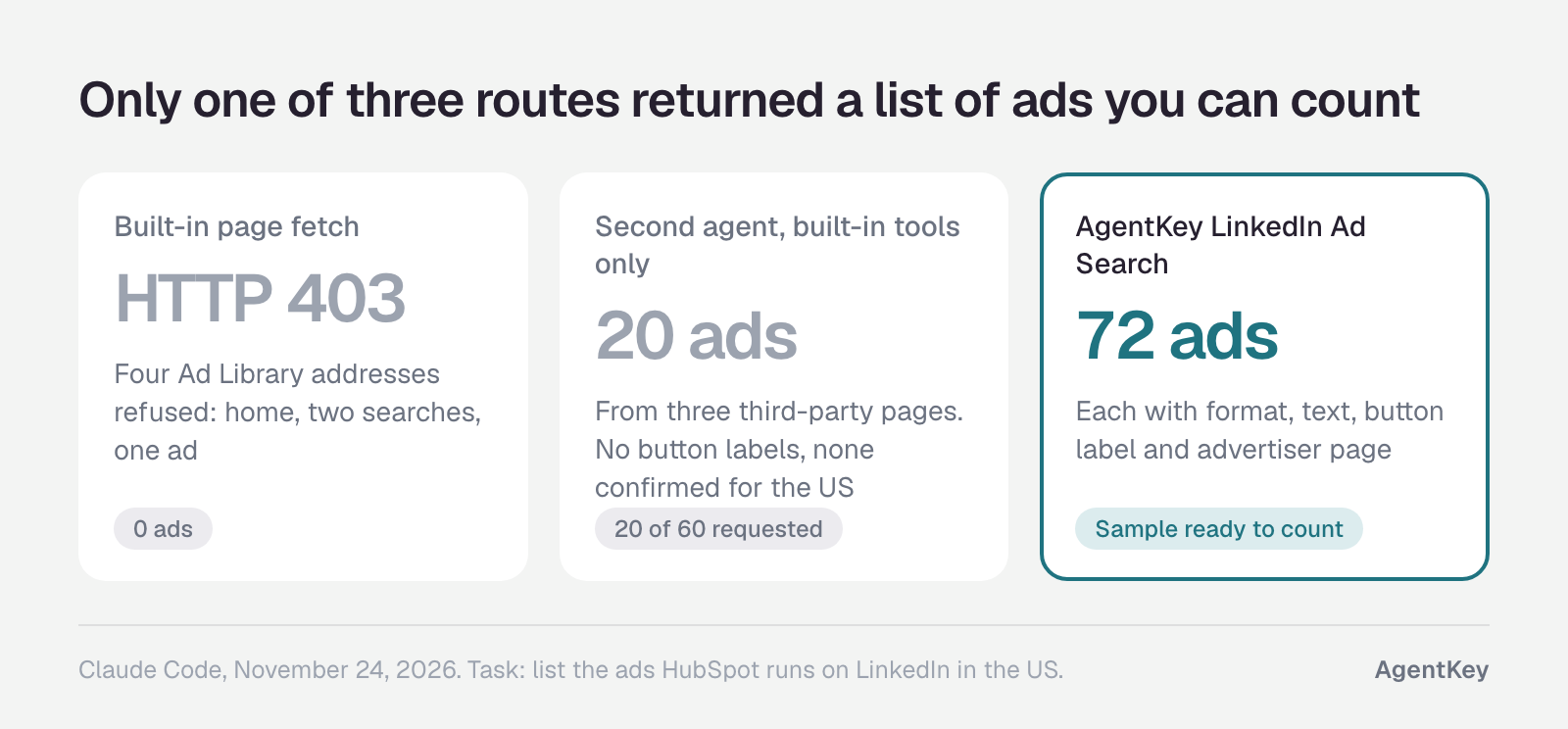
Then we gave the whole task to a second agent that had no context and only built-in search and fetch. Asked for 60 US ads, it assembled 20 ads from three third-party pages. None had a button label, 5 had dates, and none was confirmed as shown in the US.
So a rough look is possible without AgentKey, and a count by button, offer and country is not. LinkedIn's developer documentation, which we opened, describes APIs for managing your own ad accounts after an application review. We did not find a public feed of other advertisers' ads.
Which AgentKey tools does this use?
One paid tool does the reading, and the tools for finding it are free. Prices and capabilities were verified on November 24, 2026.
1. LinkedIn Ad Search
Searches the LinkedIn Ad Library by company or keyword and lists the matching ads. In the AgentKey catalog it is named AnyAPI/linkedin_ads_search.
Pricing: from 0.3 credits per call. The listed price is a minimum, because calls are billed on what the data source reports. In our run each of five calls was charged 0.3.
Features: search by company name and filter by country, which this run used; the catalog also lists a company ID, a keyword and a date range, which we did not test. Each call returned a page of 24 ads and a cursor for the next page. Each ad comes back with its ID, format, advertiser, advertiser page, headline, text and button label. Start date, end date and an impression range are filled for some ads only.
2. Tool discovery and price check
Your agent finds a tool, reads its parameters and sees its listed price before it spends anything.
Pricing: free. These calls carried no charge in our run.
Features: search the catalog in plain language; see each tool's parameters and per-call price; check remaining credits.
The four calls in the steps cost 1.2 credits in our run: three pages for the US and one for Ireland. On the Lite plan, which is $12.90 a month for 500 credits, that is about 3 cents. Our full run cost 2.1 credits, with one probe call and two single-ad lookups that the steps do not need.
How to see a competitor's LinkedIn ads, step by step
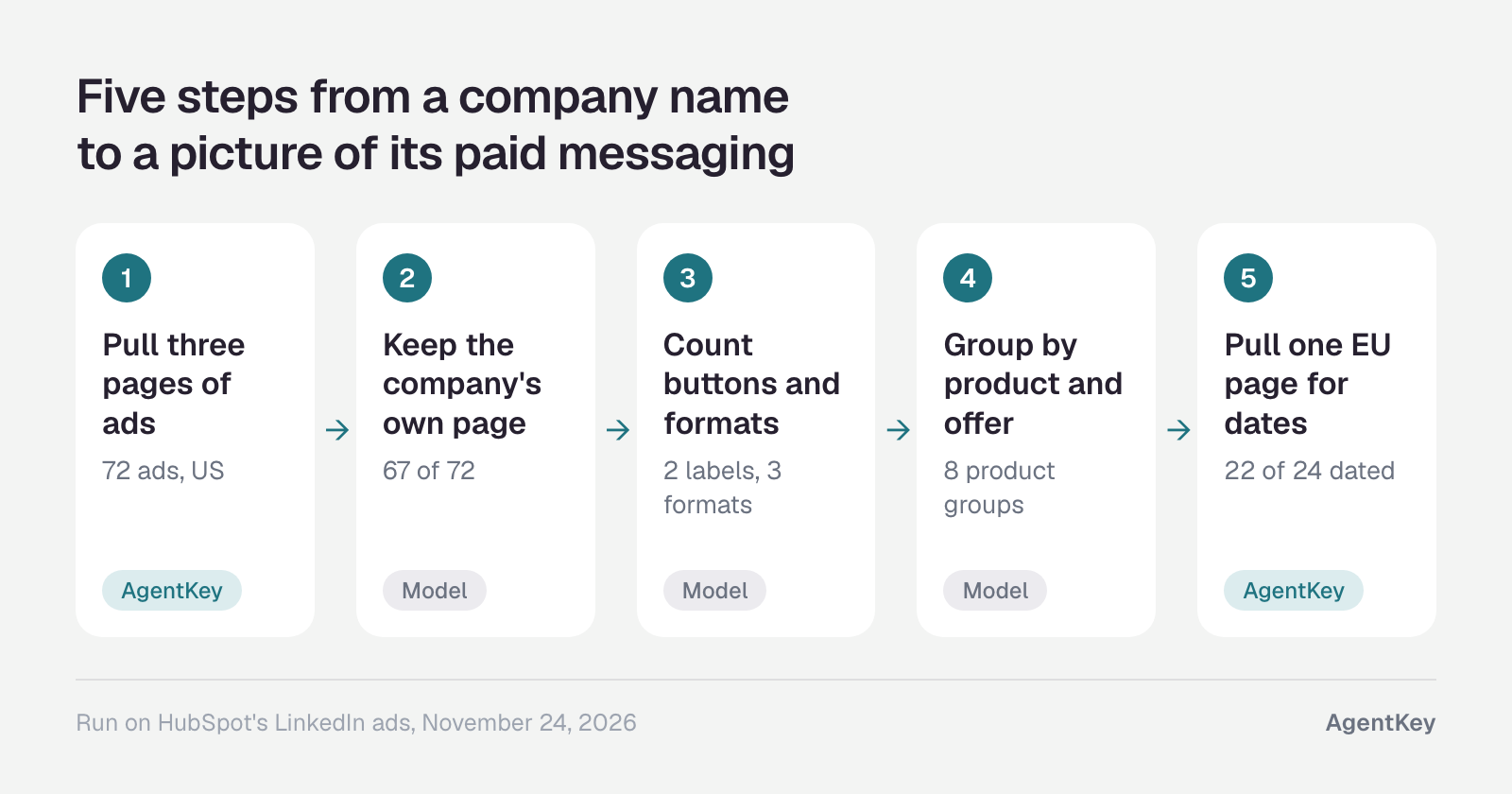
Connect AgentKey once, then run the five steps below.
Before you start
Install AgentKey with the one-line installer. It finds the agents on your machine, adds AgentKey to each, and opens a browser tab to sign in. A new account starts on the Free plan with no card.
curl -fsSL https://agentkey.app/install.sh | bashOther install methods are in the installation guide. The LinkedIn for Claude Code page shows what the connection gives you.
Then pick one company, the country you sell in and one EU country, and fix the sample size before you look at any data. We chose three pages for the US and one for Ireland.
Step 1. Pull three pages of ads
Your agent calls LinkedIn Ad Search with the company name and the country, then follows the cursor twice.
Our three calls cost 0.9 credits and returned 72 ads, 24 per page, with no repeated ad IDs. The first page reported 842 matching ads and later pages reported 0, so read that total from the first call.
Step 2. Keep the company's own page
The company search matches names, so it also returns advertisers whose names contain the word. Each ad carries the address of its advertiser's LinkedIn page, and that is the field to group on.
In our run 67 of the 72 ads came from HubSpot's main page. Four came from two separate pages for its developer and startup programs, and 1 came from a partner agency with HubSpot in its name. We counted the 67 and set the other 5 aside.
Step 3. Count buttons and formats
This step and the next are the model's work.
Buttons. "Learn more" was on 47 of the 67 ads and "Request Demo" on 15. Five had no button: four sponsored posts written in the first person and one carousel.
Formats. 37 ads were video, 29 were single images and 1 was a carousel. Five headlines ran once as an image and once as a video with the same text.
Repeats. The 62 ads with a headline used 38 distinct headlines, and one headline appeared on 5 ads. Count messages as well as ad IDs.
Step 4. Group by product and offer
Ask for one product or theme and one offer type per ad, with the product groups created from the data.
Products. 33 of the 67 ads sold one product, Marketing Studio. Connectors for AI assistants had 11, AI search visibility 7, downloadable guides 5 and sales tools 5. Agent Builder had 3, Breeze Assistant 2, and 1 was a customer story.
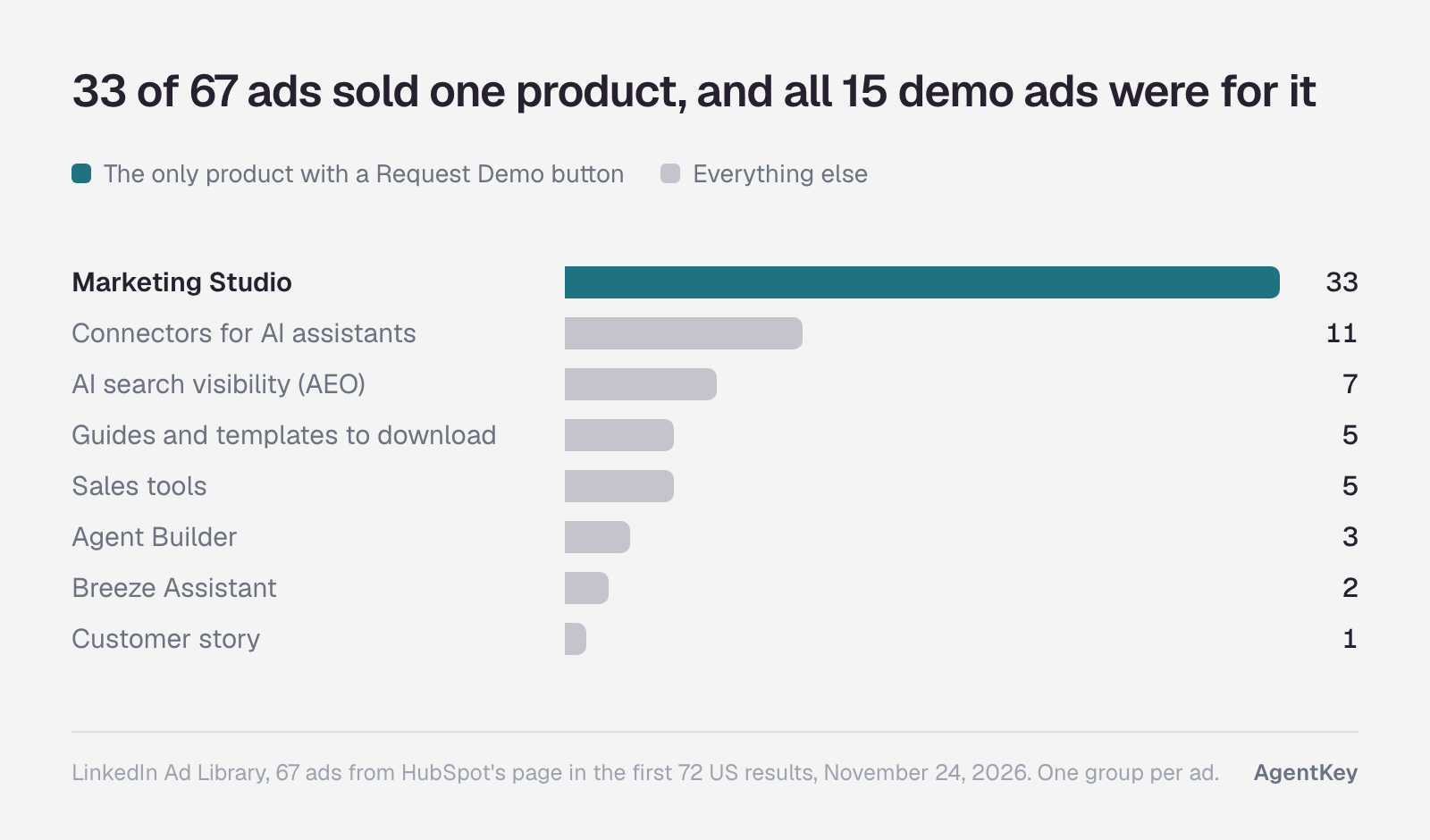
Offers. All 15 demo ads were for Marketing Studio, and 5 of them named a competing product, Marketo, in their text. Five ads offered a guide or template. The other 42 ads with a button pointed to a product with no stated offer, and none promoted an event or a free trial.
Our reading is that the demo request is reserved for one product, partly aimed at a named competitor's users. That is an inference from ad text; these ads came back with no targeting.
Step 5. Pull one EU page for dates
LinkedIn discloses run dates for only part of its library. In the US sample 3 of 72 ads came back with dates, all from the two program pages. LinkedIn's help text, as quoted in search results, says the extra details apply to ads targeted to the European Union.
So we made one more call, for 0.3 credits, with the country set to Ireland. 22 of 24 ads came back with a start date, an end date and an impression range.
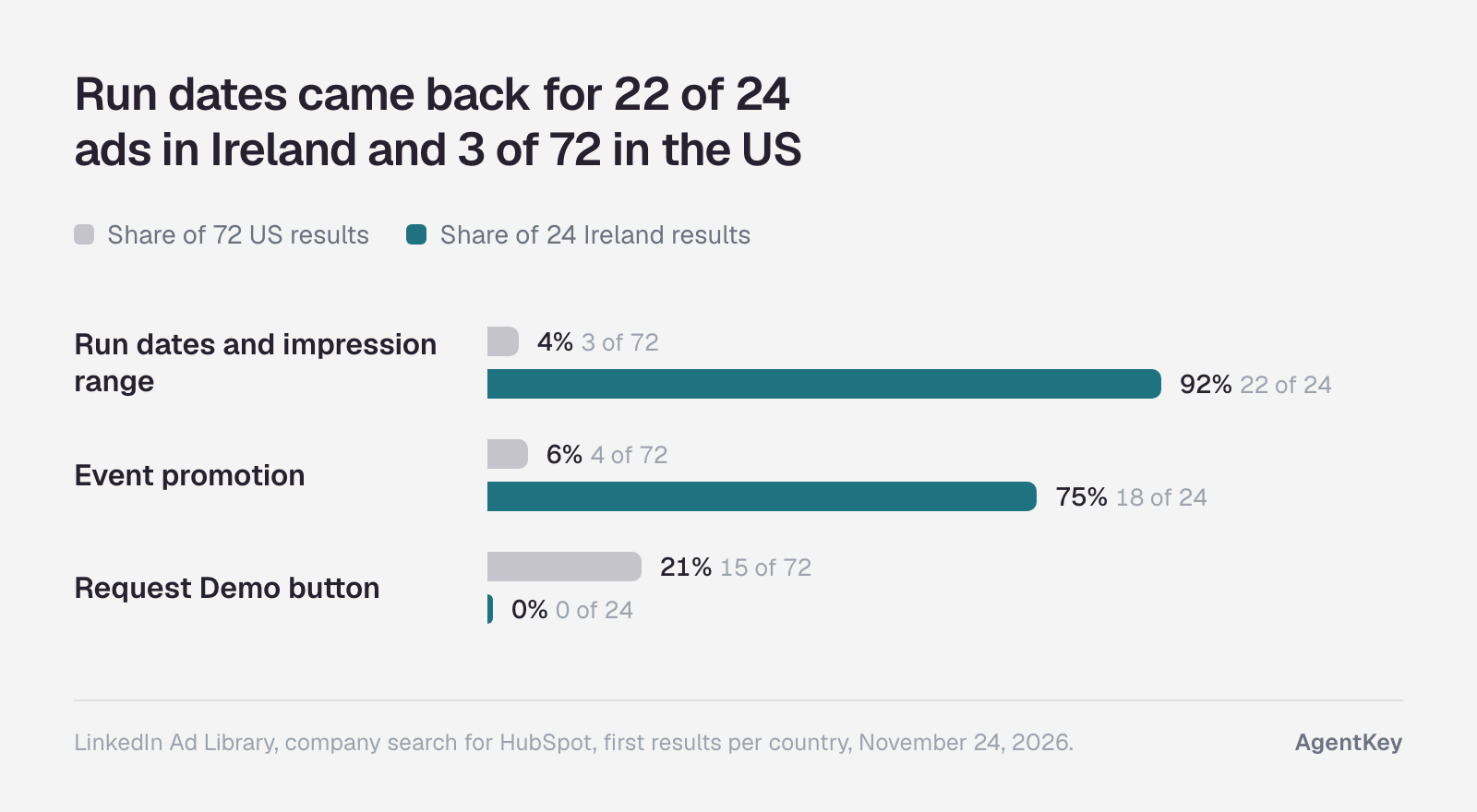
The Irish page showed different advertising. 18 of the 24 ads promoted events, against 4 of 72 in the US, and none had a Request Demo button, against 15 of 72. Thirteen were "Register" ads for one conference.
The dates show how that campaign ran. Eight of the 13 started on September 23. Three of those ended on October 13, each with 1,000 to 5,000 impressions, and 5 new ads started on October 13 and 14.
Dates also show what has stopped. 17 of the 22 dated ads had ended before the day of our run, so the library lists ads that ran, not only ads that are live.
We also looked up two single ads with LinkedIn Ad Details, at 0.3 credits each. Both returned the search fields plus an image link and no targeting, so the steps leave it out.
How do you check the results?
Recount a slice by hand, and look for the things that distort a LinkedIn Ad Library sample.
- Confirm the advertiser page. Group by the page address, not the advertiser name. Five of our 72 ads came from other pages.
- Open ten ads in one group. Each ad has a public address ending in its ID. If more than two are mislabeled, sort again.
- Do not read an undated ad as live. In Ireland 17 of 22 dated ads had ended. The 67 US ads had no dates, so we cannot say which were running on November 24.
- Do not read impressions as results. The figure is a band, the response does not split it by country, and there are no clicks or leads.
- Treat each country as its own sample. Only 1 ad ID appeared in both the US and Irish results.
- Mind the sample. The first 72 of 842 matches are a sample, in an order the tool does not explain. They support the leading product and the button split, not the gap between a group of 5 and a group of 3.
- Watch for partial records. Three Irish ads came back without an advertiser page, and two of those had no dates. When a second agent repeated the calls, different ads came back partial, and it counted 65 US ads on the main page where we counted 67.
- Expect the sort to shift. That second run put 32 ads under Marketing Studio and 8 under AI search visibility, against our 33 and 7. It found the same 15 demo ads.
- Leave people out. Some ads are sponsored posts written in the first person, and event ads name speakers. Paraphrase and drop the names.
When should you use something else?
Use a different route when a glance is enough, or when you need history and alerts.
If you want to look at a dozen ads, open the Ad Library in a browser. It shows the creative itself, which this method only describes in text. In our test a second agent also found 20 ads on third-party pages with built-in tools, so if headlines and formats are all you need, that may be enough.
If you need weekly tracking across many advertisers, with saved creative and alerts, an ad intelligence product is built for that. We did not test scheduled runs with AgentKey, and one run is a snapshot of one day.
If you need audience targeting or exact impression counts, this method does not supply them. The search returned an impression band for dated ads and nothing on audience.
This is the AgentKey blog, and AgentKey provides the tools described here. They return ads. They do not sort them, judge them or tell you which ads work.
Which tool should you use for each job?
Pick the tool from the question you are asking. Prices were verified on November 24, 2026.
- List a company's ads in one country: LinkedIn Ad Search with a company name and a country. From 0.3 credits per page of 24 ads.
- Get run dates and impression ranges: the same tool with an EU country. From 0.3 credits per page.
- Get the image link for one ad: LinkedIn Ad Details, named AnyAPI/linkedin_ad in the catalog. From 0.3 credits per ad.
- Check a price before spending: tool discovery and inspection. Free.
Conclusion
You now have a way to turn a company name into counts of buttons, formats, products and offers, with run dates where LinkedIn discloses them. Run it on a competitor in your own category, in the country you sell in and in one EU country, and compare the two.
Connect LinkedIn to your agent through AgentKey →
FAQ
Can Claude Code read the LinkedIn Ad Library without AgentKey?
Not directly in our test. On November 24, 2026, its page fetch got HTTP 403 on four Ad Library addresses. Other agents may have different built-in access.
How much does it cost to analyze one advertiser?
The four calls in our steps cost 1.2 credits for 96 ads, about 3 cents on the Lite plan. Each extra page of 24 ads was charged 0.3 credits in our run.
How many ads can I pull at once?
Each call returned 24 ads, and a cursor fetches the next page. We pulled 72 of 842 US matches and did not test how far paging goes.
Does LinkedIn show how long an ad has run?
For some ads. In our run 22 of 24 Irish results carried a start and an end date, and 3 of 72 US results did.
Does the data show which ads perform best?
No. There is no spend, click or lead data. Impression ranges came back only with dated ads, and reading a large range as success is an inference.
Does AgentKey sort the ads into products and offers?
No. AgentKey returns the ads, and your agent's model does the sorting.
Is there a free way to try it?
A new account starts on the Free plan, which includes complimentary credits and needs no card. Finding and inspecting tools does not use credits.