How to Track What a Competitor Posts on LinkedIn With AgentKey
Pull a company's 50 newest LinkedIn posts with AgentKey, set reposts aside, and count themes, formats, weekly pace and reactions per theme. Steps, tool, price and the prompt.
Turn a company's LinkedIn page into counts of what it posts, in which formats, how often, and which themes draw reactions. Connect AgentKey, then paste this into your agent:
Use AgentKey's AnyAPI/linkedin_company_posts tool to show me what [COMPANY] publishes on its LinkedIn company page: [COMPANY PAGE URL]. Check the listed price with describe_tool before the paid call; it is a minimum, so expect a higher charge. Add up credits_charged after every call, and if the total passes 1.6 credits, stop and ask me.

Make one call with url set to the page URL, limit 50 and postedLimit 3months. Pass nothing else, and never includeReposts or includeQuotePosts: you separate reposts yourself. If it times out, retry up to three times. If your client saves the response to a file, read it there. Tell me how many posts came back of the 50 requested, the newest and oldest dates (createdUtc, UTC), whether they are in date order, and which fields each post carries. If 50 came back and the oldest is under three months old, the cap cut the window short, so use the real date range.

Separate reposts first: rows with a repostCreatedUtc field link to another account's post and show that post's counts. Count them as a fifth format, and keep them out of the themes and reaction figures.

Give each own post one theme: product, company news (acquisitions, partnerships, funding), interview or show episode, event, customer story, hiring, research or opinion, or other. A feature built with a partner is product. Give each one format, checked in this order: video (postVideo is set), image (postImages is not empty), article link (articleUrl is set), otherwise text only. Report posts per week (Monday to Sunday, UTC, reposts counted separately) with the busiest week; the count per theme and per format; and the median reactions (the likes field) and median comments per theme, with the number of posts beside every median. List the five own posts with the most reactions, each as a one-line paraphrase with date, theme and counts.

Paraphrase, do not quote. Name no people. Keep what the posts show apart from what you infer about [COMPANY]'s strategy, and say which themes have too few posts to compare.
B2B marketers and competitive-intelligence analysts watch a competitor's LinkedIn page because it shows what the company chooses to say in public, week after week. Scrolling the page gives an impression. Counting the posts shows which themes it repeats, which formats it uses, and which posts people react to.
The obstacle is getting the posts as a list. In our test, an AI agent's built-in tools were refused on the company page and came back with one usable post out of the 50 requested. This guide shows how one AgentKey call returns 50 posts with dates and counts, and how to sort and compare them.
We ran every step on Stripe's company page on November 24, 2026. AgentKey returned the posts; the agent's model sorted and counted them. Statements about the company's strategy are our inference and are labeled that way.
At the end you will have:
- A count of the company's own posts by theme and by format.
- Posts per week, with the busiest weeks.
- Median reactions and comments per theme, with the number of posts behind each.
- A list of what to check before you trust the numbers.
Why can't an AI agent read a company's LinkedIn posts on its own?
In our test it could not list them: the company page refused the built-in fetch, and search returned fragments without dates or counts.
We asked Claude Code to read Stripe's company page with its built-in tools first. Its page fetch got HTTP 403 on the company page and on the page's posts tab.
The built-in web search did reach linkedin.com. It returned links to the company page, regional copies of it and personal profiles, with snippets of a few posts and no reaction or comment counts.
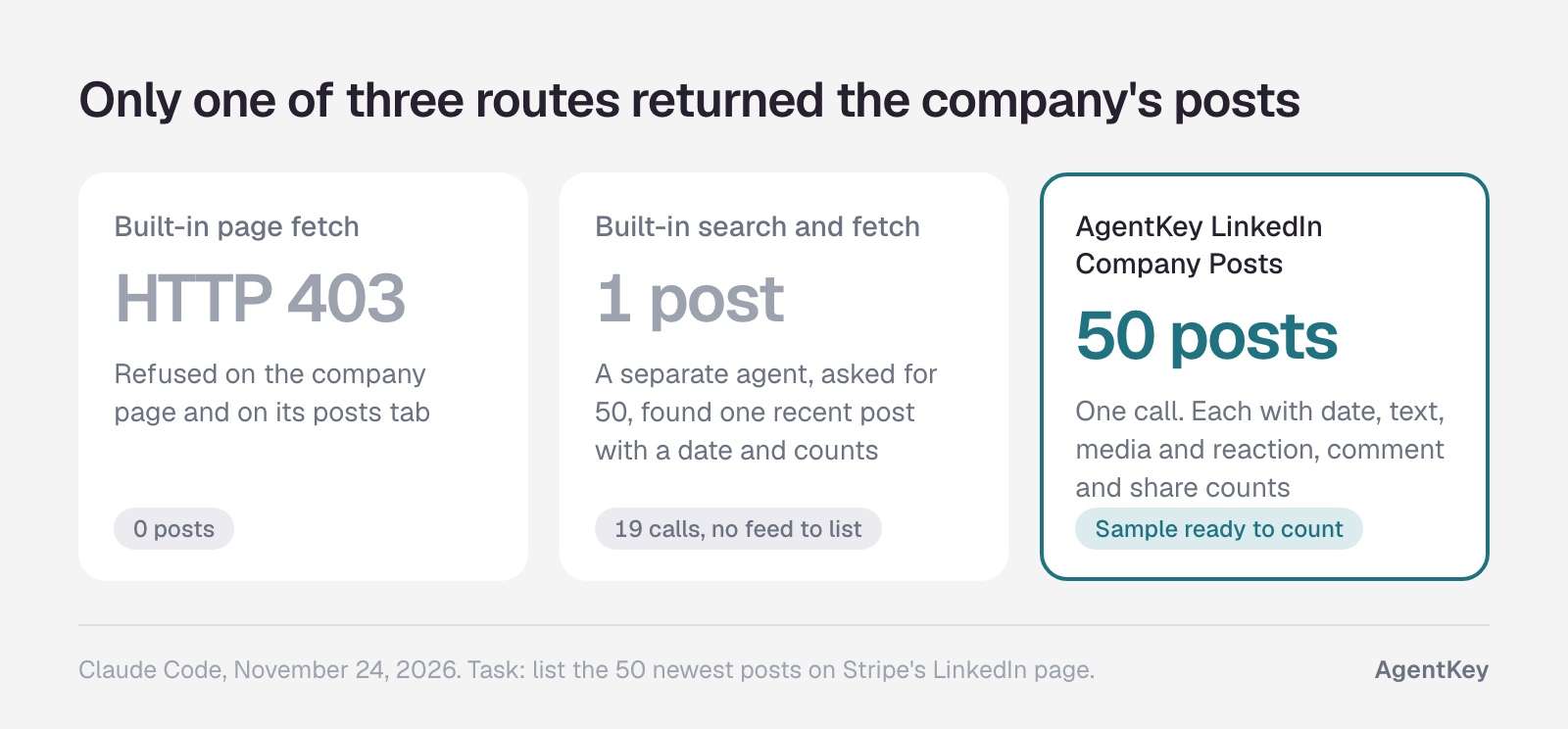
Then we gave the whole task to a separate agent with no context and only the built-in tools. In 19 calls it found 1 post from this year with a date and counts, out of the 50 it was asked for.
Single post pages do open if you already have the link. What the built-in tools could not do is list the page's recent posts, so there was nothing to count.
Which AgentKey tools does this use?
One tool does the reading, and finding it is free. Prices and capabilities were verified on November 24, 2026.
1. LinkedIn Company Posts
Lists the recent posts on one company page. In the AgentKey catalog it is named AnyAPI/linkedin_company_posts.
Pricing: from 0.6 credits per call; the price is metered, so the listed figure is a minimum. In our run two calls without a date window were charged 0.6 each, and the call with a three-month window was charged 0.8. In a separate run the same day, calls that set includeReposts to false were billed per post instead: 0.7 credits for 1 post, 2.4 for 5 and 21.3 for 50.
Features: the company page URL, a limit of up to 50 posts and a date window from one hour to one year, which this run used; switches to leave out reposts and quote posts, which it did not use and which the prompt tells your agent not to pass. Each post came back with its text, link, date, image or video details, and counts of reactions, comments and shares with a breakdown by reaction type. The tool has no paging, so 50 posts is the most one call returns.
2. Tool discovery and price check
Your agent finds a tool, reads its parameters and sees its listed price before it spends anything.
Pricing: free. These calls came back with no charge record.
Features: search the catalog in plain language, and see each tool's parameters and listed per-call price.
The steps below need one call, which was charged 0.8 credits in our run. Our whole run made three paid calls for 2.0 credits, including a first look at the response format and a call without the date window.
How to track a competitor's LinkedIn posts, step by step
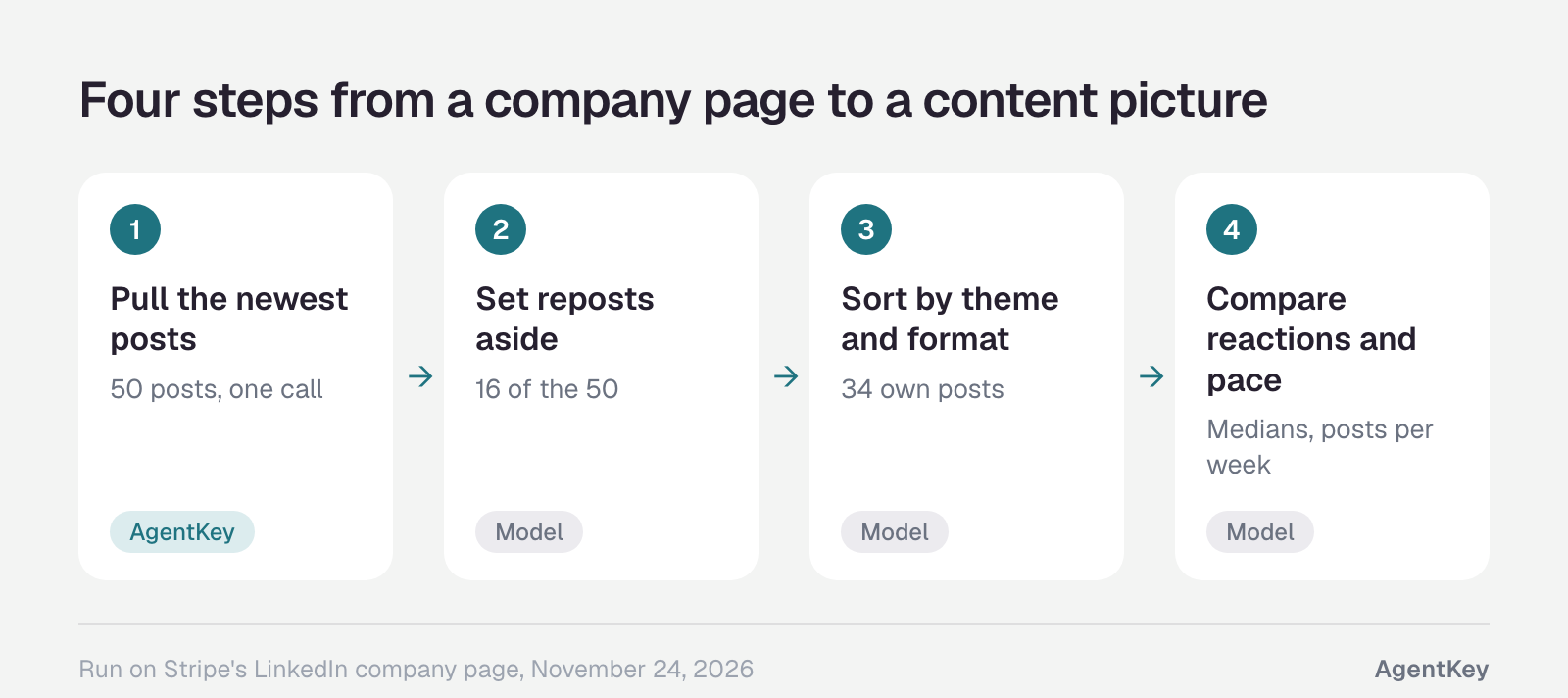
Connect AgentKey once, then run four steps: pull the posts, set reposts aside, sort, and compare.
Before you start
Install AgentKey with the one-line installer. It finds the agents on your machine, adds AgentKey to each, and opens a browser tab to sign in. A new account starts on the Free plan with no card.
curl -fsSL https://agentkey.app/install.sh | bashOther install methods are in the installation guide, and the LinkedIn for Claude Code page shows what the connection gives you.
Then pick one company and copy the address of its LinkedIn company page. We chose Stripe.
Step 1. Pull the newest posts
Ask for up to 50 posts from the past three months in one call. Your agent calls LinkedIn Company Posts with the page URL, limit 50 and the three-month window.
Our call returned 50 posts for 0.8 credits, newest first. The oldest was from September 15, so the cap of 50 cut the three-month window to about nine weeks, ending November 19.
Use the date window. Our earlier call without it also returned 50 posts, reaching back to August 4, but out of date order and without 10 posts from September 17 to October 6 that the windowed call returned.
The response ran to about 98,000 characters. Claude Code saved it to a file, and the agent read it from there.
Step 2. Set reposts aside
Separate the reposts before you count anything. 16 of the 50 posts were reposts of other accounts' posts: 13 from personal profiles and 3 from other company pages.
A repost row links to the original post and carries that post's counts. One reposted post showed 43,928 reactions, more than ten times the 4,200 on the company's own most-reacted post, and would have distorted every average.
This step is the model's work and uses no credits. It left 34 posts written by the company itself.
Do not ask the tool to drop the reposts for you. In the separate run, setting includeReposts to false moved the same tool to about 0.43 credits per post, against 0.8 for all 50 posts in our call.
Step 3. Sort by theme and format
Ask for one theme and one format per post. In our run 16 of the 34 own posts were product updates, and 8 of those use the word agent.
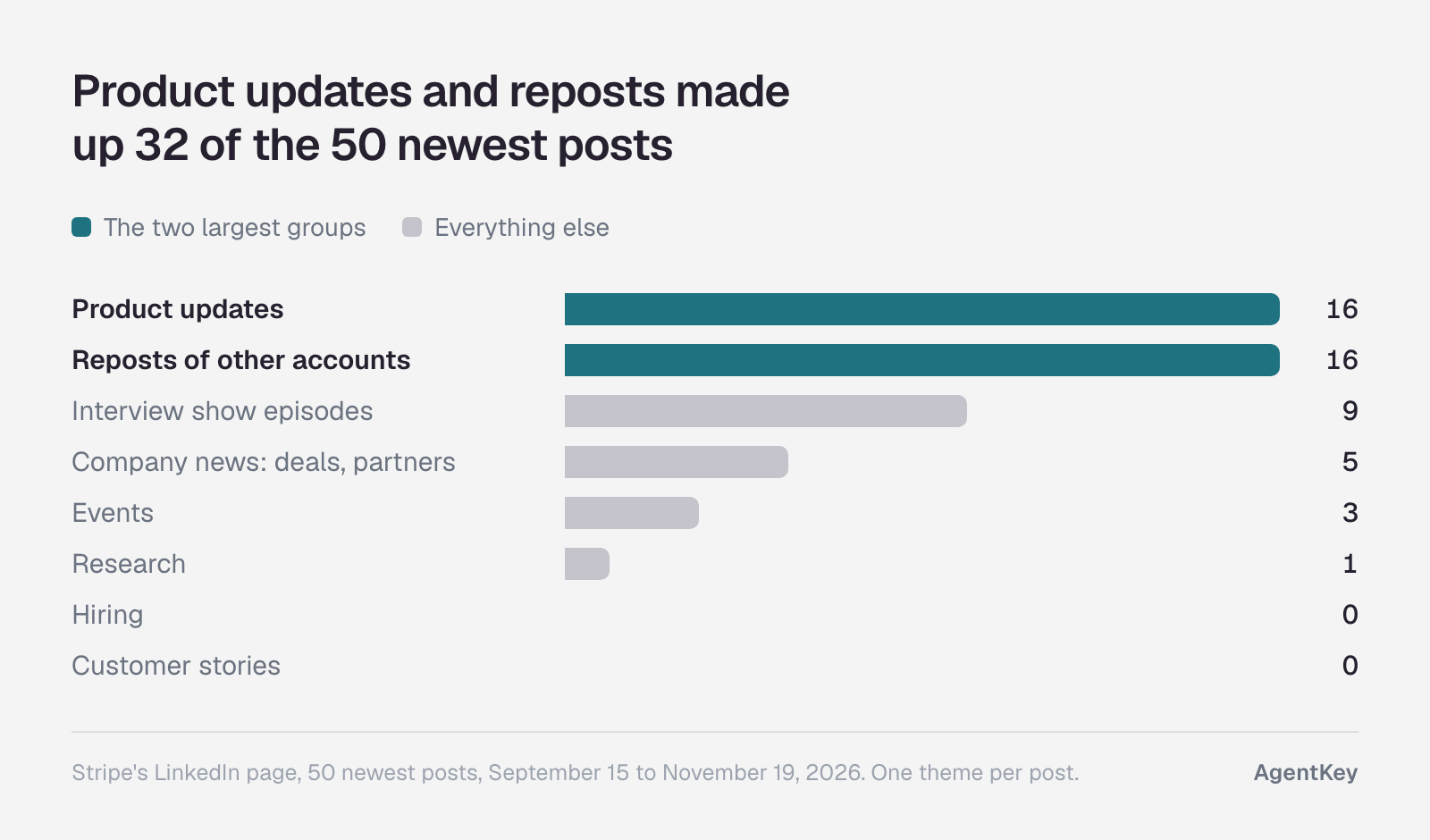
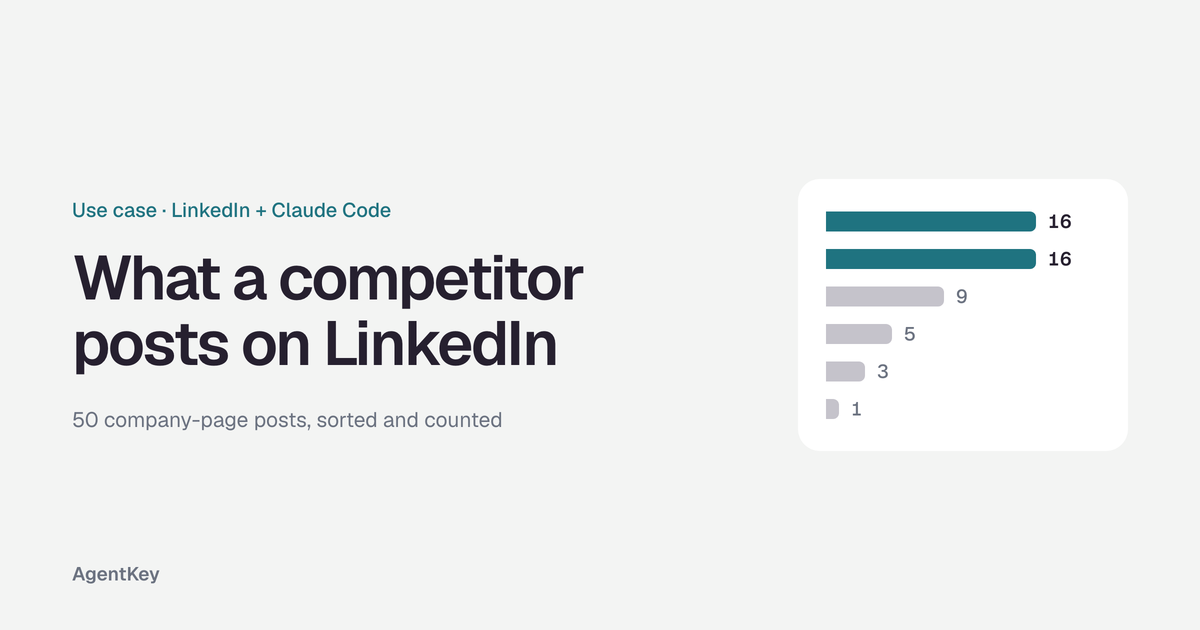
Together, product updates and reposts made up 32 of the 50 posts. Nine posts were episodes of the company's interview shows, 5 were company news such as acquisitions and partnerships, 3 promoted events and 1 shared research. None was about hiring, and none was a customer story.
Video was the main format: 20 of the 34 own posts, including all 9 interview episodes and 11 of the product updates. Twelve were image posts, one was an article link and one was text only.
Step 4. Compare reactions and pace
Compare medians, and keep the number of posts beside each one. Company news drew a median of 1,108 reactions from 5 posts, while product updates drew 199 from 16.
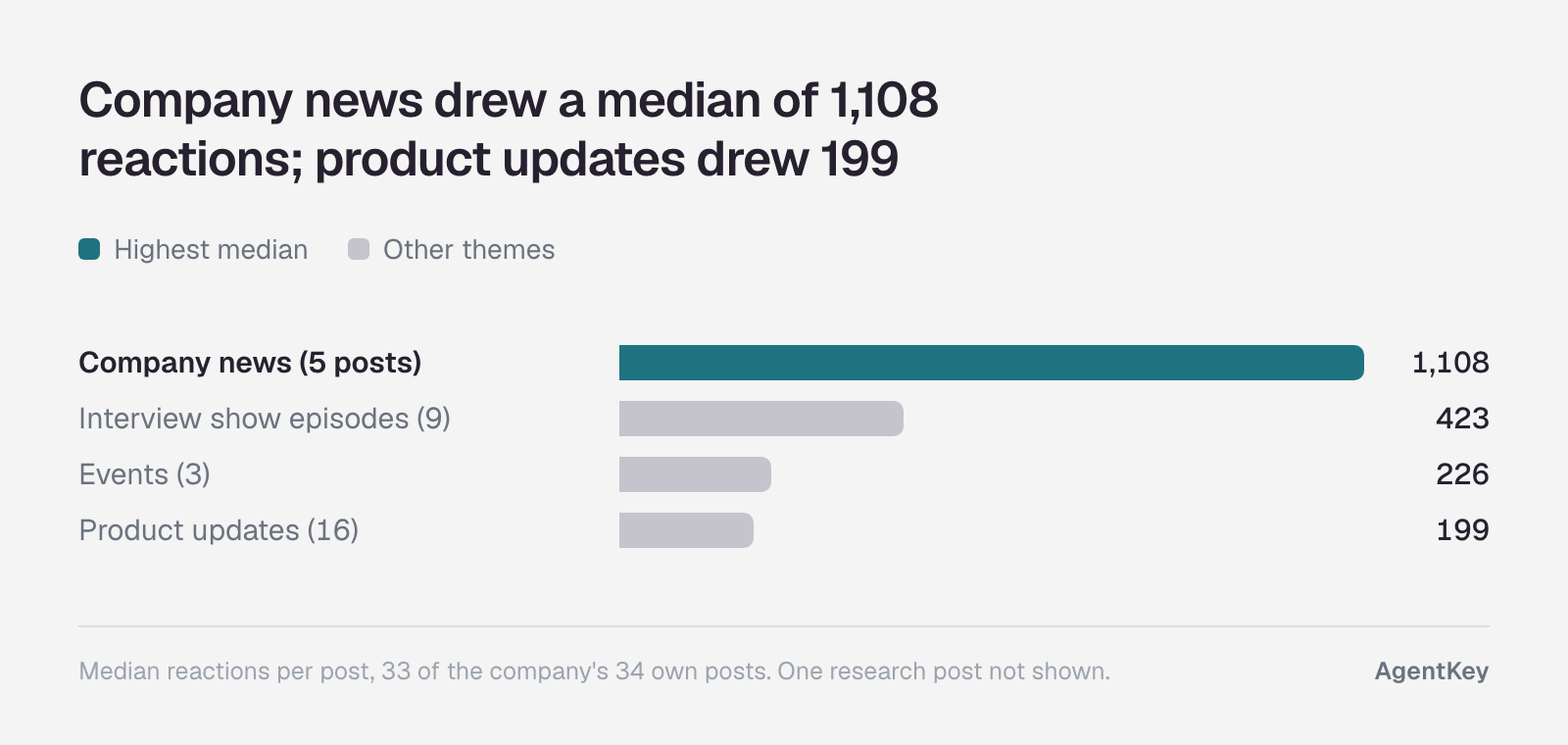
Interview episodes had a median of 423 reactions from 9 posts, and events 226 from 3. Comments were closer together: a median of 56 for company news, 28.5 for product updates and 22 for interview episodes.
The page published about 5.4 posts a week over the nine weeks, 3.7 of them its own. 17 of the 50 posts went out in the two weeks from October 19.
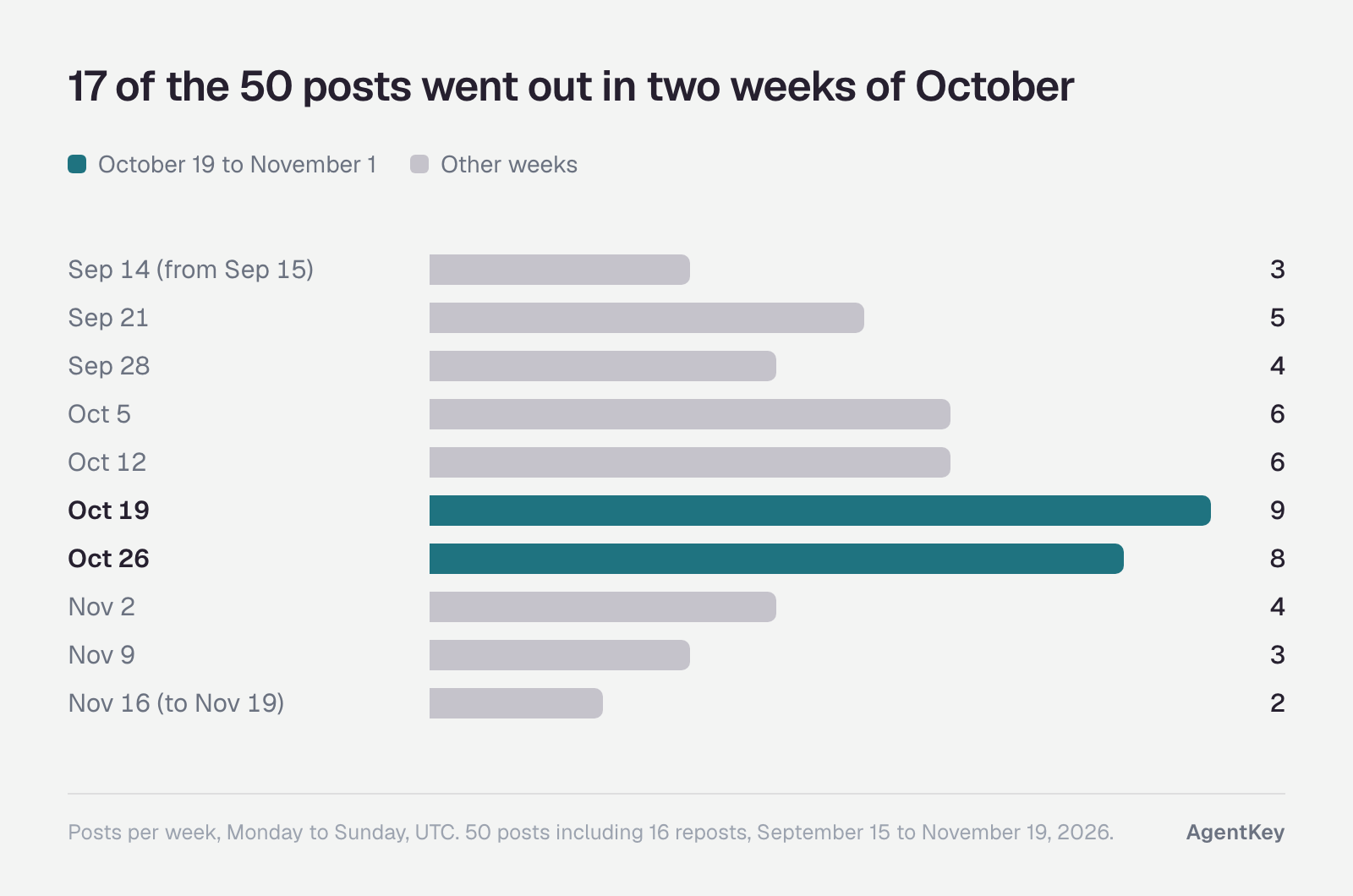
The other eight weeks had between 2 and 6 posts each, and 41 of the 50 posts went out on a Tuesday, Wednesday or Thursday.
Our reading, which is inference: the page works mainly as a product launch feed and a channel for the company's own shows, and its audience reacts most to deals. Five news posts are too few to treat that as a rule.
How do you check the results?
Recount a slice by hand, and look for the things that distort a sample of posts.
- Count what came back. We asked for three months and got nine weeks, because 50 posts is the cap. Report the real date range.
- Check the order. The windowed call came back newest first. The call without a window did not, and it missed 10 posts inside its own date range.
- Watch the charge. Our calls were charged 0.6 and 0.8 credits. A separate run the same day set includeReposts to false and was charged 0.7 credits for 1 post, 2.4 for 5 and 21.3 for 50. The tool's description gives no price for that switch, so leave it out and read the charge after every call.
- Keep reposts out of the averages. Their counts belong to the original posts.
- Mind the small groups. A median from 5 or 3 posts can move with one post. A separate agent running this prompt put 15 posts under product and 6 under company news, where we had 16 and 5, and its company news median was 917.5.
- Read reactions as reactions. They are what the page showed on the day we pulled them, and newer posts have had less time to collect them. They are not reach or sales.
When should you use something else?
Use a different route when you need the page's own analytics, a long history, or a single post.
If the page is your own, LinkedIn's page analytics show impressions and clicks, which this method cannot see. If you need more than the 50 newest posts, or a record kept over many months, a social listening product that stores history fits better; we did not test scheduled runs with AgentKey.
If you only need one post and already have its link, your agent's built-in page fetch may be enough. In our test it opened a single post page and read its reaction count.
This is the AgentKey blog, and AgentKey provides the tools described here. They return posts. They do not sort them, judge them or tell you what a competitor plans to do.
Which tool should you use for each job?
Pick the tool from the question you are asking. Prices were verified on November 24, 2026.
- List a company page's recent posts with counts: LinkedIn Company Posts, with a date window and limit 50. From 0.6 credits per call; 0.8 in our run.
- Text and links only, no counts: the catalog lists a basic version of the tool from 0.3 credits per call. We did not call it.
- Check a price before spending: tool discovery and inspection. Free.
Conclusion
You now have a way to turn a competitor's LinkedIn page into counts by theme, format and week, with reactions compared across themes. Run it on a company you track, keep the inference apart from the counts, and repeat it next quarter to see what changed.
Connect LinkedIn to your agent through AgentKey →
FAQ
Can Claude Code read a LinkedIn company page without AgentKey?
Not as a list. On November 24, 2026, its page fetch got HTTP 403 on the company page and on its posts tab, and it opened a single post page when given the link. Other agents may have different built-in access.
Do I need to write code?
No. You install AgentKey with one command and ask in plain language. In our run the agent wrote its own short scripts to read the saved response.
How much does it cost to analyze one company page?
The one call in the steps was charged 0.8 credits in our run, and two separate agents running the prompt were each charged 0.8. The price is metered: a separate run that set includeReposts to false was charged 21.3 credits for 50 posts, so keep the prompt's parameters and its stop condition as written.
How many posts can I pull in one call?
Up to 50, and the tool has no paging. For Stripe's page, 50 posts covered about nine weeks, 16 of them reposts.
Does AgentKey sort the posts into themes?
No. AgentKey returns the posts. Your agent's model sets reposts aside, assigns themes and computes the medians, which is why two runs can draw the theme boundaries differently.
Which agents can run this?
We ran it in Claude Code. AgentKey also lists setup steps for other clients such as Cursor, Codex and ChatGPT on its supported agents page. We tested Claude Code only.
Is there a free way to try it?
A new account starts on the Free plan, which includes complimentary credits and needs no card. Finding and inspecting tools does not use credits, so you can check a tool's listed price before any paid call.