How to Measure Reactions to a Product Launch on X With AgentKey
Connect X to your AI agent with AgentKey, pull a page of posts for each of the first four days after a launch, and count praise, complaints, questions and the topics behind them.
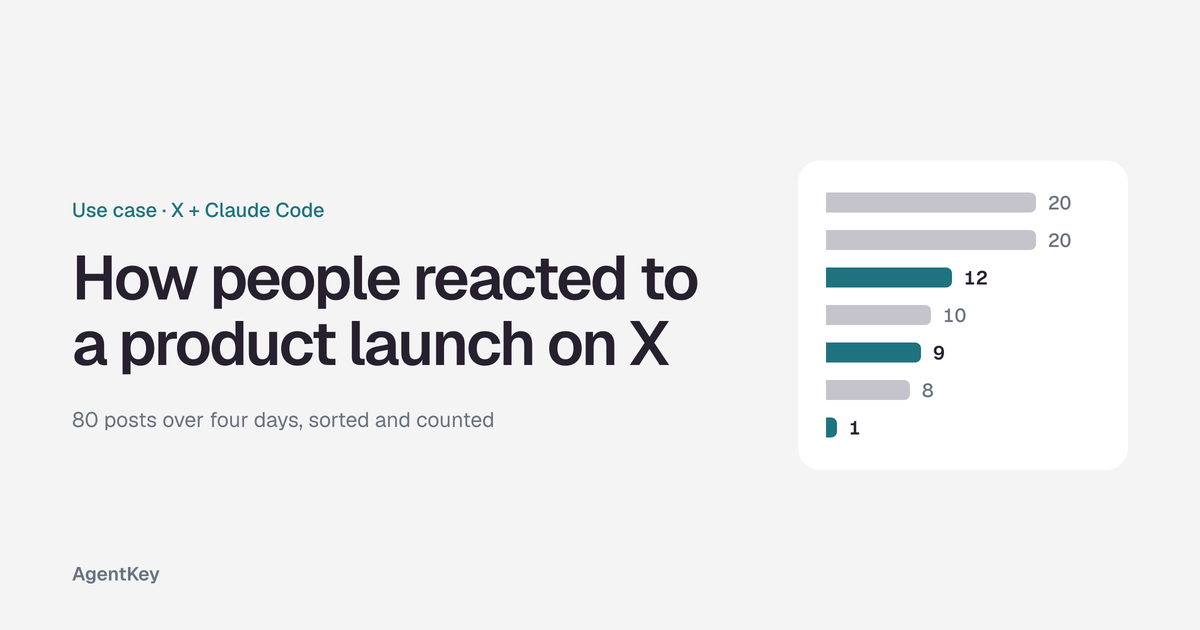
Get a counted picture of how people on X reacted to a product launch in its first days: what they praised, what they complained about, what they asked, and how the mix changed by day. Connect AgentKey, then paste this into your agent:
Use AgentKey's X / Twitter Search tool (AnyAPI/twitter_search) to measure reactions to [PRODUCT], announced on [DATE]. Check its listed price first and add up the credits charged after each call. Stop and ask me if the total passes 3 credits or one call is charged more than 1. If a call times out, try again, up to three attempts per search.

Run one search per day for the first four days, starting with the announcement day: the query "[PRODUCT] lang:en until:YYYY-MM-DD" with that day's date, sorted by Latest, one page of up to 20 posts, no cursor. Do not use requireFields or requireSinglePage. Use the jq option to keep, for each post under .data.items, only id, createdUtc (Unix seconds), text, isReply, likeCount, replyCount and viewCount.

Before you count, tell me what came back, then carry on: posts returned against 80 requested, earliest and latest post time per day in UTC (it may not match the date asked for), lowest and highest like count per day, number of replies, credits charged per call, and whether any post ID or text repeats.

Give every post exactly one type: praise, complaint, question, news link, deal, joke or comparison with no verdict, or passing mention (mainly about something else). A publisher's link is a news link even if its headline has an opinion; a joke that clearly takes a side is praise or complaint. Give each praise and complaint one topic from the data. Report counts per type per day and in total, and counts per topic, each with up to three example post IDs.

Paraphrase; do not quote posts or name accounts. Treat what posts say as claims, not facts. Separate what the counts show from what you infer, and say when a difference between days is too small to matter.
A marketing or communications lead wants to know how a launch landed while it is still landing. Scrolling X gives an impression, and the loudest posts set it. A count needs a fixed sample for each day, with dates.
In our test an AI agent could not pull that sample on its own, because X refused every page it tried to open. This guide shows how AgentKey supplies the posts. We ran every step on November 24, 2026, on Apple's HomeView, which was announced on October 13, and the numbers below come from that run.
AgentKey covers one part of the job. It returns the posts; your agent's model sorts them, and you check the result. Posts are claims by the people who wrote them, and 20 posts a day is a small sample.
At the end you will have:
- Counts of praise, complaints, questions and four other post types, per day and in total.
- The topics behind the praise and the complaints, with example post IDs.
- A record of which hours each day's sample covers, and what the run cost.
Why can't an AI agent measure launch reactions on X on its own?
In our test, X refused every page the agent's built-in fetch asked for, and its web search returned post snippets with no dates or like counts. A count by day needs both.
We asked Claude Code to do the task with its built-in tools first, on November 24, 2026. The page fetch tried five X addresses: a search page, a profile, a single post, a trending page and the embed endpoint. All five answered HTTP 402 Payment Required.
Web search did reach X. A search limited to x.com returned 10 links: 3 trending pages and 7 posts, each with a cut-off title and no date. A search of the whole web returned 16 links to news sites and blogs, none on X.
We then gave the task to a separate agent with no other context and the same built-in tools. Ten searches limited to X gave it 62 post snippets, mostly from news outlets and large accounts.
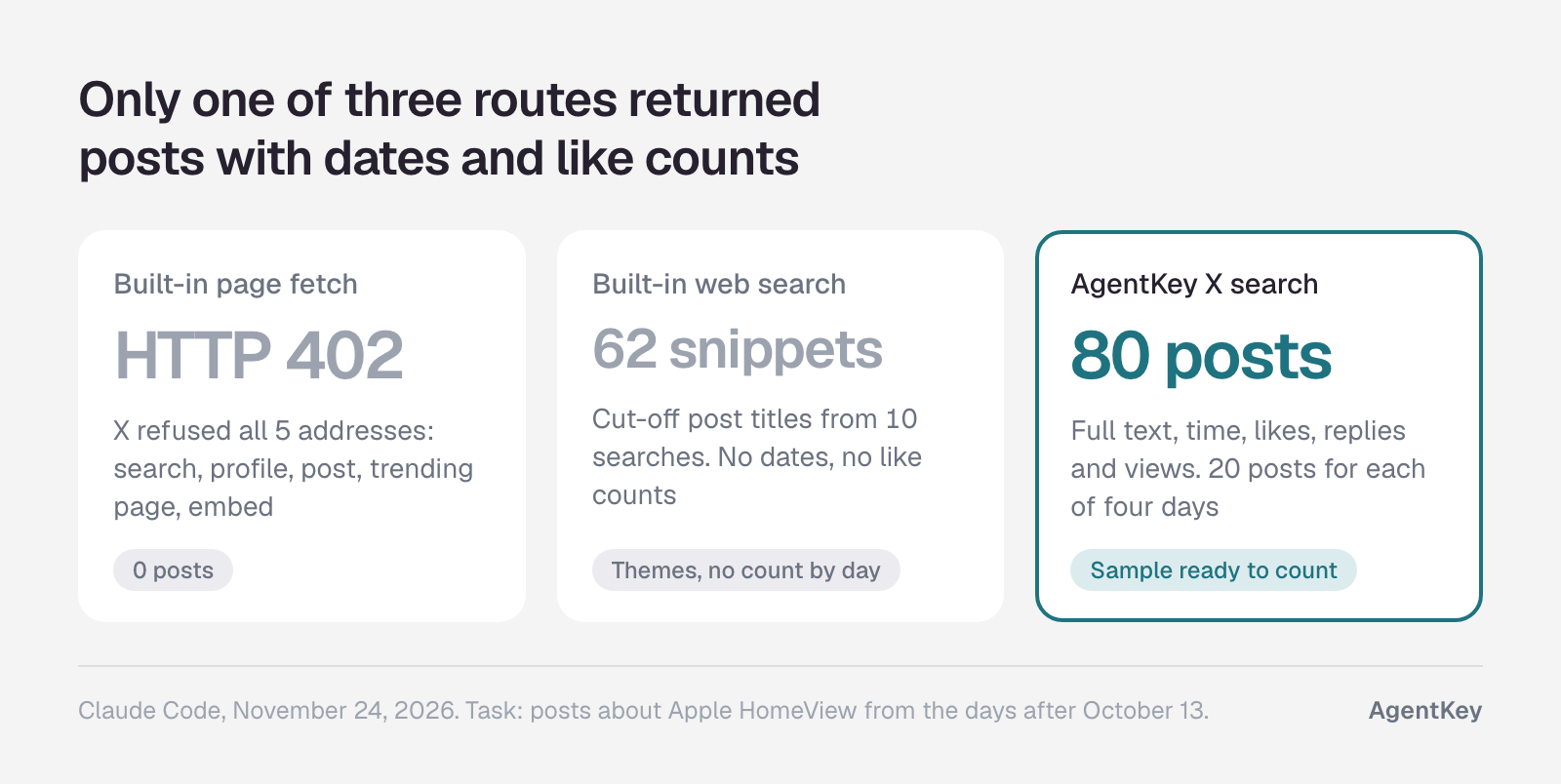
That agent could list themes. It could not count by day, because no snippet carried a date. It estimated dates from the post IDs, and that put 30 posts on day one and 1 on day five, a drop it put down to search ranking.
A third-party mirror returned one post by its ID, with a date and a like count, and it has no search. X's own API is the other route. It needs developer access set up by an engineer, and we did not test it.
Which AgentKey tools does this use?
One tool does the reading, and the tools for finding it are free. Prices and capabilities were verified on November 24, 2026.
1. X / Twitter Search
Searches public posts on X with X's own search operators. In the AgentKey catalog it is named AnyAPI/twitter_search.
Pricing: from 0.2 credits per call, and the listed price is a minimum. In our run three calls were charged 0.5 and one was charged 0.2, each for a page of 20 posts. A separate test run of the same four searches was charged 0.2 per call.
Features: X's search operators (this run used lang: and until:, plus since: on one call) and Latest or Top order (we used Latest); the catalog also lists author and minimum-like filters, photo and video searches, a larger page size and a cursor for the next page, none of which we used. Each post comes back with its ID, text, time, a reply flag, and like, reply, repost and view counts. The catalog presents until: as a date filter; in our run until:2026-10-13 returned posts up to 06:59 UTC on October 14, which is the end of October 13 in US Pacific time.
2. Tool discovery and price check
Your agent finds a tool, reads its parameters and sees its listed price before it spends anything.
Pricing: free.
Features: search the catalog in plain language; see each tool's parameters and listed price; check remaining credits.
The four calls in the steps cost 1.7 credits in our run. On the Lite plan, which is $12.90 a month for 500 credits, that is about 4 cents. The test run paid 0.8 credits for the same four searches.
Listed prices are minimums, because calls are billed on what the data source reports. The catalog says a call served by another source can cost up to about four times the listed price.
The catalog holds other X search tools, listed from 0.2 to 4.4 credits per call. We did not run them, which is why the prompt names the one we used.
How to measure launch reactions on X, step by step
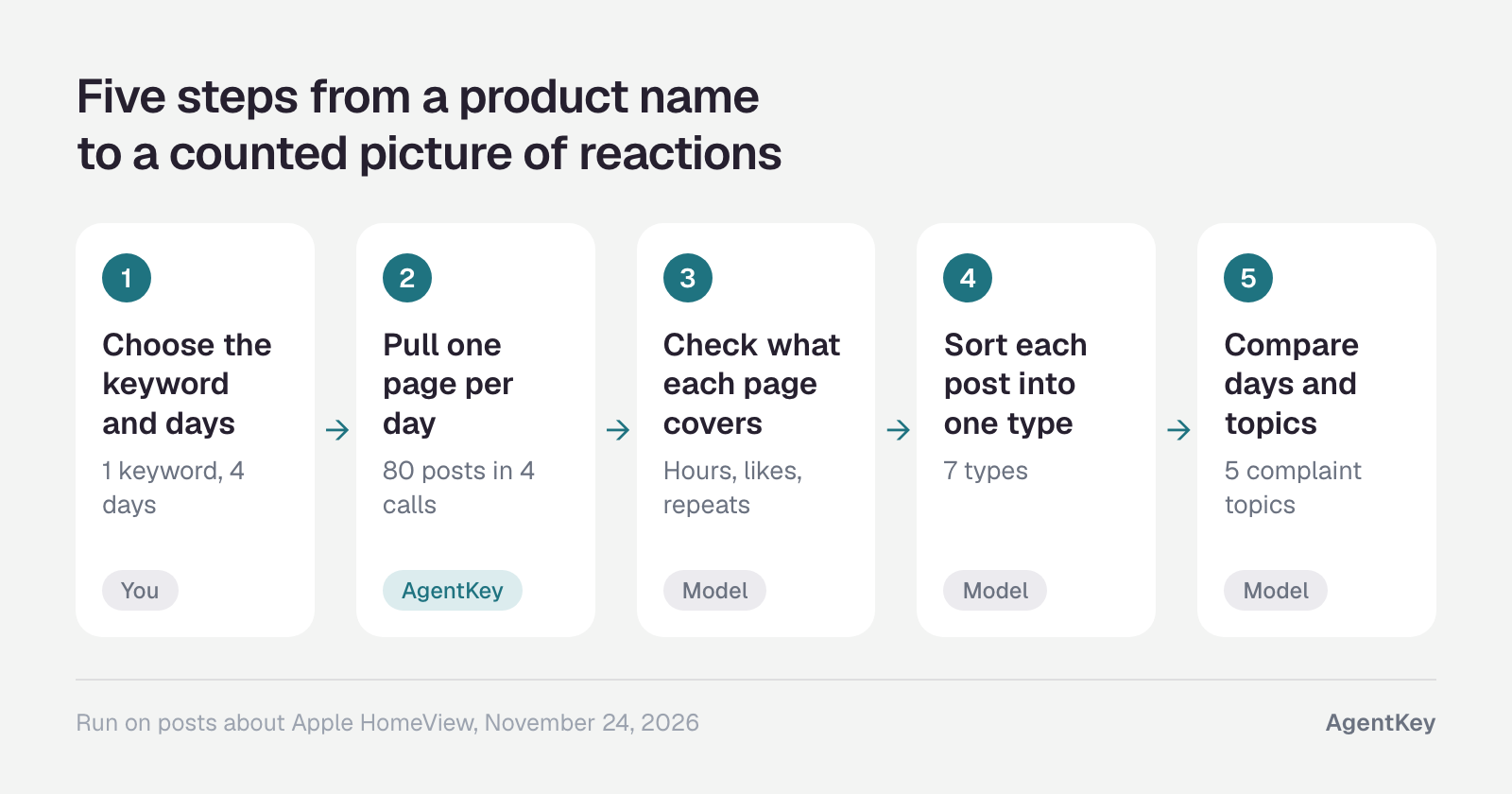
Connect AgentKey once, then run five steps: choose the keyword and the days, pull a page per day, check what each page covers, sort the posts, and compare days and topics.
Before you start
Install AgentKey with the one-line installer. It finds the agents on your machine, adds AgentKey to each, and opens a browser tab to sign in. A new account starts on the Free plan with no card.
curl -fsSL https://agentkey.app/install.sh | bashOther install methods are in the installation guide. The X for Claude Code page shows what the connection gives you.
Step 1. Choose the keyword and the days
Pick the one word people use for the product, because X only returns posts that contain every word in the query. Take the announcement date from the company's own press release.
We used HomeView and October 13, 2026, the date on Apple's release. We fixed four days and one page per day before reading any post. This step costs nothing.
Step 2. Pull one page of posts per day
Your agent calls X / Twitter Search once per day, with the keyword, lang:en and until: set to that day, in Latest order. Ask it to keep only the fields it needs, which leaves author names out.
Our four calls returned 80 posts, 20 per day, for 1.7 credits. Two calls timed out first and worked on the second try.
Step 3. Check what each page covers
A page is the newest 20 posts before a cutoff, so it is not the whole day. Have the agent report the hours covered and the range of like counts before it counts anything.
In our run the newest post on each page fell between 06:00 and 07:00 UTC on the following day, which is late evening in US Pacific time. The four pages reached back 6 to 14 hours from there, so each one is an evening sample.
Day one was different in kind. All 20 of its posts had at least 105 likes, while the lowest count on each other day was 0 or 1. We do not know why, so we read day one as popular posts and the other days as a mix.
Five of the 80 posts were replies, and no post ID repeated.
Step 4. Sort every post into one type
This step is the model's work. Ask for exactly one type per post, from a fixed list.
22 of the 80 posts praised, complained or asked a question: 12 complaints, 9 posts of praise and 1 question. The other 58 were 20 news links, 20 jokes and comparisons with no verdict, 10 passing mentions and 8 deals.
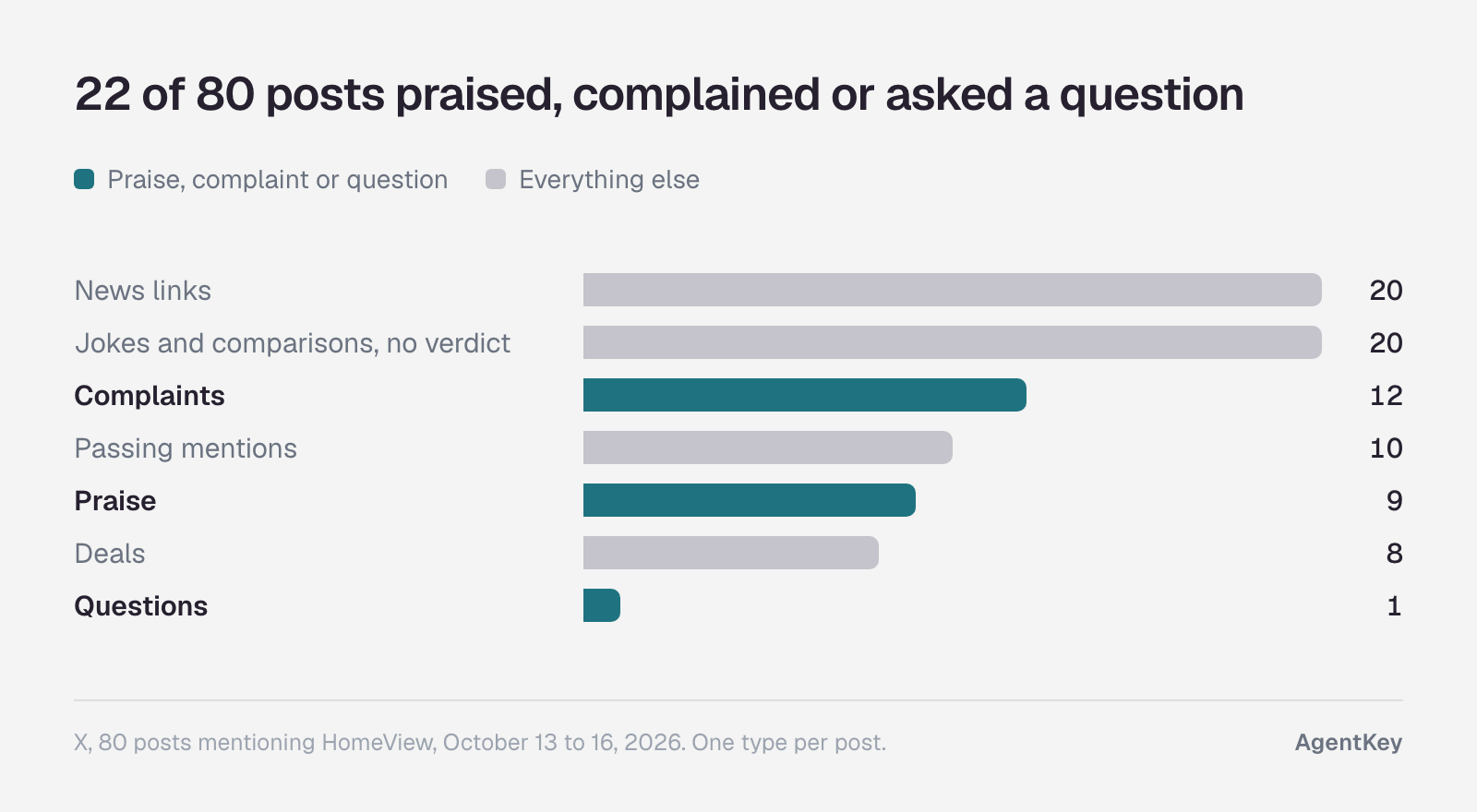
One question in 80 posts was the surprise. Our reading is that questions sit in replies under other posts, and a keyword search returns few replies.
Step 5. Compare the days and the topics
Count each type per day, then give each complaint and each post of praise one topic.
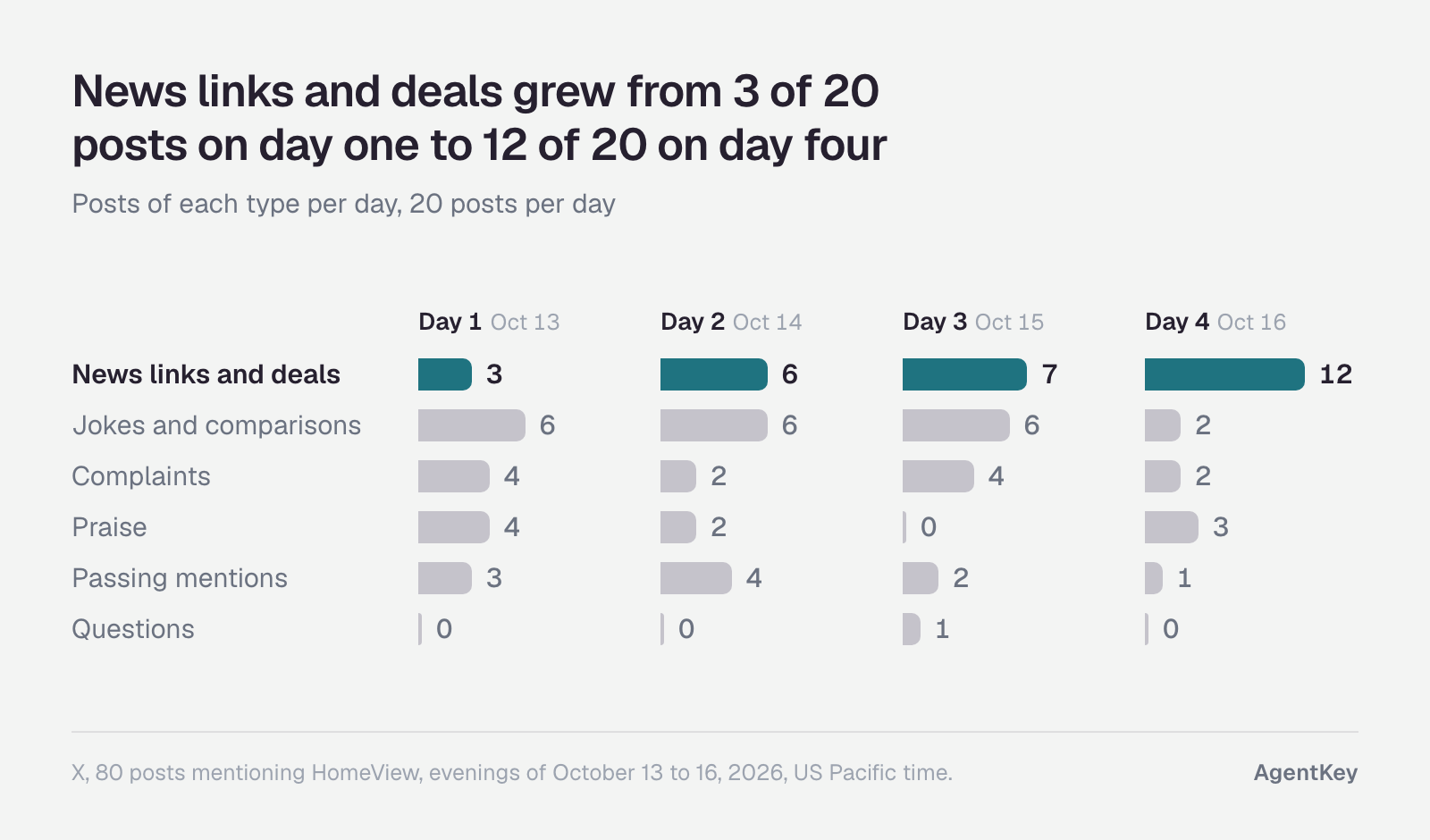
News links and deals went from 3 of 20 posts on day one to 6, then 7, then 12 of 20 on day four. All 8 deals appeared on days three and four, in posts that advertised pre-order discounts.
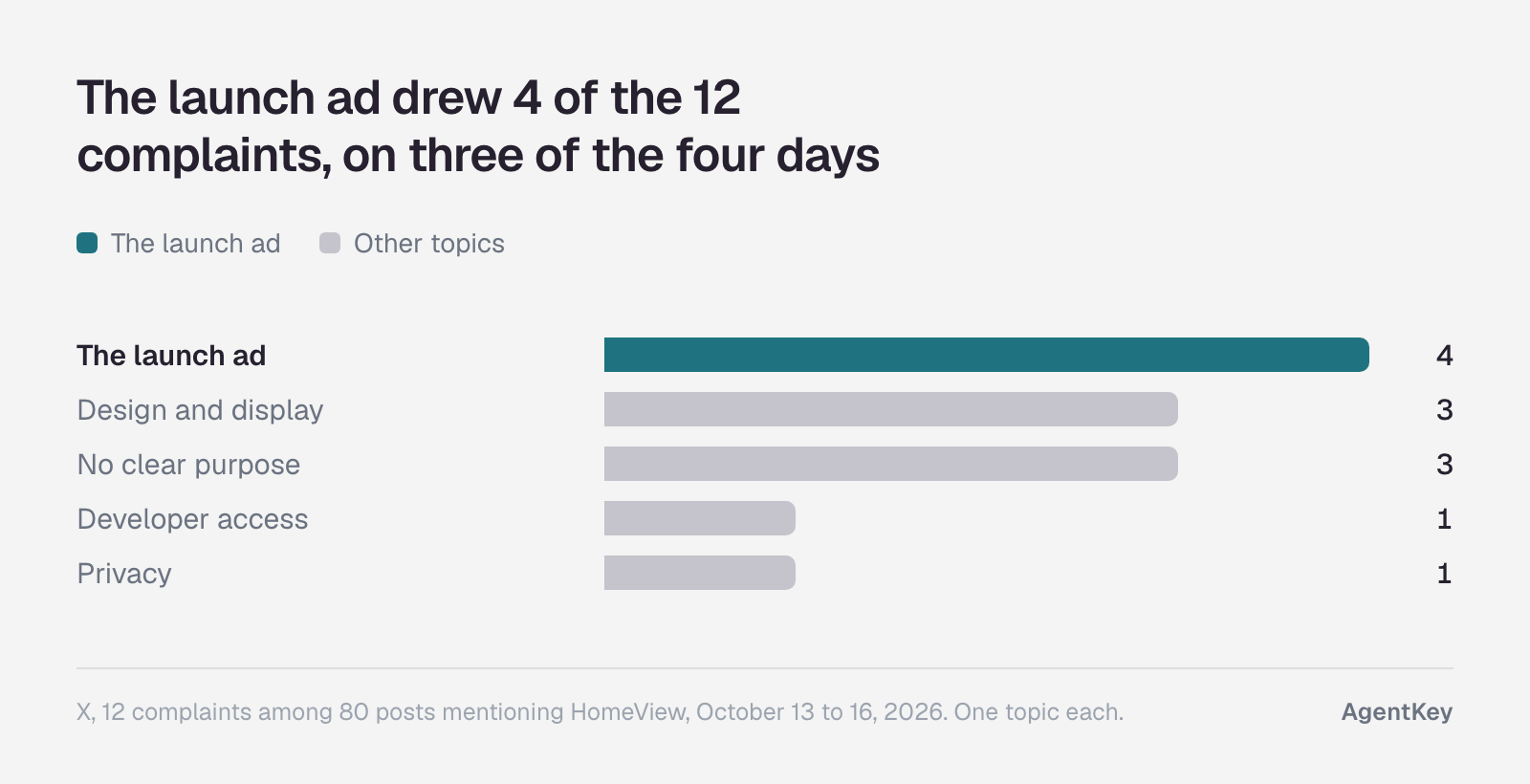
The launch ad drew 4 of the 12 complaints, on days one, three and four. Design and display drew 3, all on days one and two, and 3 said the product had no clear purpose, on days two and three.
The 9 posts of praise spread wider: 3 for the interface, 2 that simply wanted one, and 1 each for pricing strategy, a single hub, the cables and the ad.
With 20 posts a day, a gap of two or three posts between days means nothing. The rise in links and deals is the one change large enough to note, and day one's different make-up weakens even that.
How do you check the results?
Recount a slice by hand, and check the three things that distort a sample like this: the hours covered, the posts returned, and how the model sorted them.
- Read the time window, not the date. Each page covered 6 to 14 evening hours in US Pacific time. Morning reactions and other time zones are thin or missing.
- Run it twice if the count matters. A separate agent ran the same four searches, and 71 of its 80 post IDs matched ours. Day two shared only 11 of 20, so a page of Latest posts is a sample of the day.
- Expect the sorting to move. That agent counted 13 complaints, 10 posts of praise and 1 question against our 12, 9 and 1. Jokes that take a side and feature show-offs were the hard cases.
- Open ten posts in one type. A post opens at x.com/i/web/status/ followed by its ID. If more than two are mislabeled, tighten the definitions and sort again.
- Look for repeated text. Our IDs were unique, yet two deal posts on day three carried nearly the same wording.
- Treat posts as claims. Prices, specs and discounts in posts are what the writers said. Check them against the company's own pages before you repeat them.
- Keep people out of the report. Paraphrase, and leave out names and handles, including handles mentioned inside a post's text.
When should you use something else?
Use a different route when a list of themes is enough, or when you need every post.
If you only want the main talking points, your agent's built-in web search may be enough. In our test it surfaced 62 post snippets, which was enough to name themes and too little to date them.
If you need full volume, hourly trends or alerts over several weeks, a social listening product or X's own API is built for that. We did not test either, and one run here is a sample of 80 posts.
If the questions people ask matter most, a keyword search is a poor fit. The AgentKey catalog lists a tool for the replies under one post, which we did not run.
This is the AgentKey blog, and AgentKey provides the tools described here. The search tool returns posts. It does not sort them, judge them or tell you whether a launch went well.
Which tool should you use for each job?
Pick the tool from the question you are asking. Prices were verified on November 24, 2026.
- Pull one day's posts about a product: X / Twitter Search with a keyword, lang: and until:. From 0.2 credits per page of 20; three of our four calls were charged 0.5.
- Sort posts into praise, complaints and questions: your agent's model. No AgentKey call.
- Check a price before spending: tool discovery and inspection. Free.
Conclusion
You now have a way to turn the first days of a launch on X into counts of praise, complaints and questions, with the topics behind them and the hours each sample covers. Run it on your own launch, or on a competitor's, and keep the post IDs so someone else can recount.
Connect X to your agent through AgentKey →
FAQ
Can Claude Code read posts on X without AgentKey?
Not in our test. On November 24, 2026, its page fetch got HTTP 402 from five X addresses, and its web search returned post snippets without dates. Other agents may have different built-in access.
How much does it cost to measure one launch?
In our run the four searches cost 1.7 credits for 80 posts, about 4 cents on the Lite plan. The same searches cost 0.8 credits in a test run, so budget for the higher figure.
How many posts can I pull at once?
Each call returned 20 posts. The tool lists a larger page size and a cursor for the next page, and we tested neither.
Does the date filter return the day I ask for?
Not exactly. In our run until: with a date returned posts from as late as 06:00 to 07:00 UTC on the next day, and each page reached back only 6 to 14 hours. Ask your agent to report the hours covered.
Does AgentKey sort the posts into praise and complaints?
No. AgentKey returns the posts. Your agent's model does the sorting, which is why the prompt asks for example post IDs you can check.
Why did so few posts ask a question?
One of our 80 posts asked one. Our reading is that questions sit in replies, and only 5 of the 80 posts were replies.
Is there a free way to try it?
A new account starts on the Free plan, which includes complimentary credits and needs no card. Finding and inspecting tools does not use credits, so you can check a tool's price before any paid call.