How to Find Which TikTok Video Formats Get Watched for a Product With AgentKey
Connect TikTok to your AI agent with AgentKey, pull the search results for a product keyword, and count which video formats are common and which get watched.
Pull TikTok's search results for a product keyword and count which video formats are common and which get watched. Connect AgentKey, then paste this into your agent:
Use AgentKey to find which TikTok video formats are common, and which draw the most engagement, for the keyword [KEYWORD] in [COUNTRY CODE]. Check the tool's price first and add up credits_charged after every call. Stop and ask me if the total passes 2.4 credits or one call costs over 0.4. Retry timeouts up to three times.

Call TikHub/fetch_video_search_result_api_v1_tiktok_app_v3_fetch_video_search_result_get with that exact keyword, region and count 20 for offsets 0, 20, 40, 60, 80 and 100. Pass no other parameters. Each response is about 1.7 MB: read the saved file by script, never print it. Items are in data.data.search_item_list. From each aweme_info keep aweme_id, region, desc, create_time, video.duration (milliseconds), the statistics counts including lose_count, author.follower_count, aigc_info.created_by_ai, the text_info of interaction_stickers, and any TikTok Shop product in anchors (type 35; title and review_num are in nested extra JSON). Drop author names.

Remove duplicate IDs. Keep videos whose region field matches my country, with an English caption, about the product. Treat statistics with lose_count 1 as missing, not zero. Report rows returned, unique videos, the region mix, what each filter removed, the date range and how many are under 30 days old.

Give each video one format from its caption and on-screen text: feature pitch, personal reaction, recipe or make-with-me, problem and fix, deal or buy-now call, test or challenge, unboxing, comparison, how-to, or unclear. Per format report the count, median plays, likes, shares, comments and length, and how many passed 1 million plays; repeat median plays for videos at least 30 days old. Report how many link a TikTok Shop product, how many link the most-linked listing, how many are AI-flagged, median plays by length band (under 15, 15-29, 30-59, 60+ seconds), and the ten most-played videos' first caption or on-screen line, paraphrased. Call them Video 1, 2, 3 with follower-size bands. Engagement is not sales: say so, and separate data from inference.
Social media managers and e-commerce sellers decide what to film by scrolling TikTok search and remembering what looked popular. That keeps two or three viral clips in mind and loses the rest: how common each format was, how old the videos were, and how many carried a shop link.
An AI agent can count instead, if it can get the results with their numbers. In our test Claude Code's own tools managed that in one run of two, through an unofficial mirror of a hashtag feed, and never for a keyword search.
This guide shows how one AgentKey tool returns keyword search results with plays, likes, shares, comments, length and shop links, and how to turn them into a format comparison. We ran every step on "portable blender" for the US on November 24, 2026.
AgentKey returns the data. Your agent's model labels each video from its caption and on-screen text without watching it; you check the result. The numbers measure engagement: nothing here says how many blenders a video sold.
At the end you will have:
- A count of the video formats in the search results for your keyword.
- Each format's median plays, likes, shares, comments and length, for videos of similar age.
- A count of the videos that link a TikTok Shop product.
How far can an AI agent get on TikTok on its own?
In our test it got as far as one hashtag feed, in one run of two. The task needs a sample of videos for a product keyword, each with its play, like, share and comment counts and its length.
We asked Claude Code to get that with its built-in tools first. The page fetch opened a TikTok search page, a hashtag page, a topic page and a video page, and each came back as the same 22 characters: the page title.
The web search, limited to tiktok.com, returned 10 links with captions as titles and no play counts or lengths. TikTok's public embed endpoint returned an embed code and no numbers.
Then we gave the whole task to two agents with no context and only the built-in tools. The first found an unofficial third-party mirror of the #portableblender feed and read 69 videos with stats from it. By the mirror's own flags, 24 of the 69 were posted from the US and not marked as ads.
That run had limits. The mirror refused keyword search with HTTP 403, the fetch tool's summary model transcribed the numbers, and it cut about half the captions short. One video also appeared in our AgentKey sample, and its play count matched to within 24 plays in 30.4 million.
The second agent, given insulated water bottles, came back with 26 video links and no play counts at all.
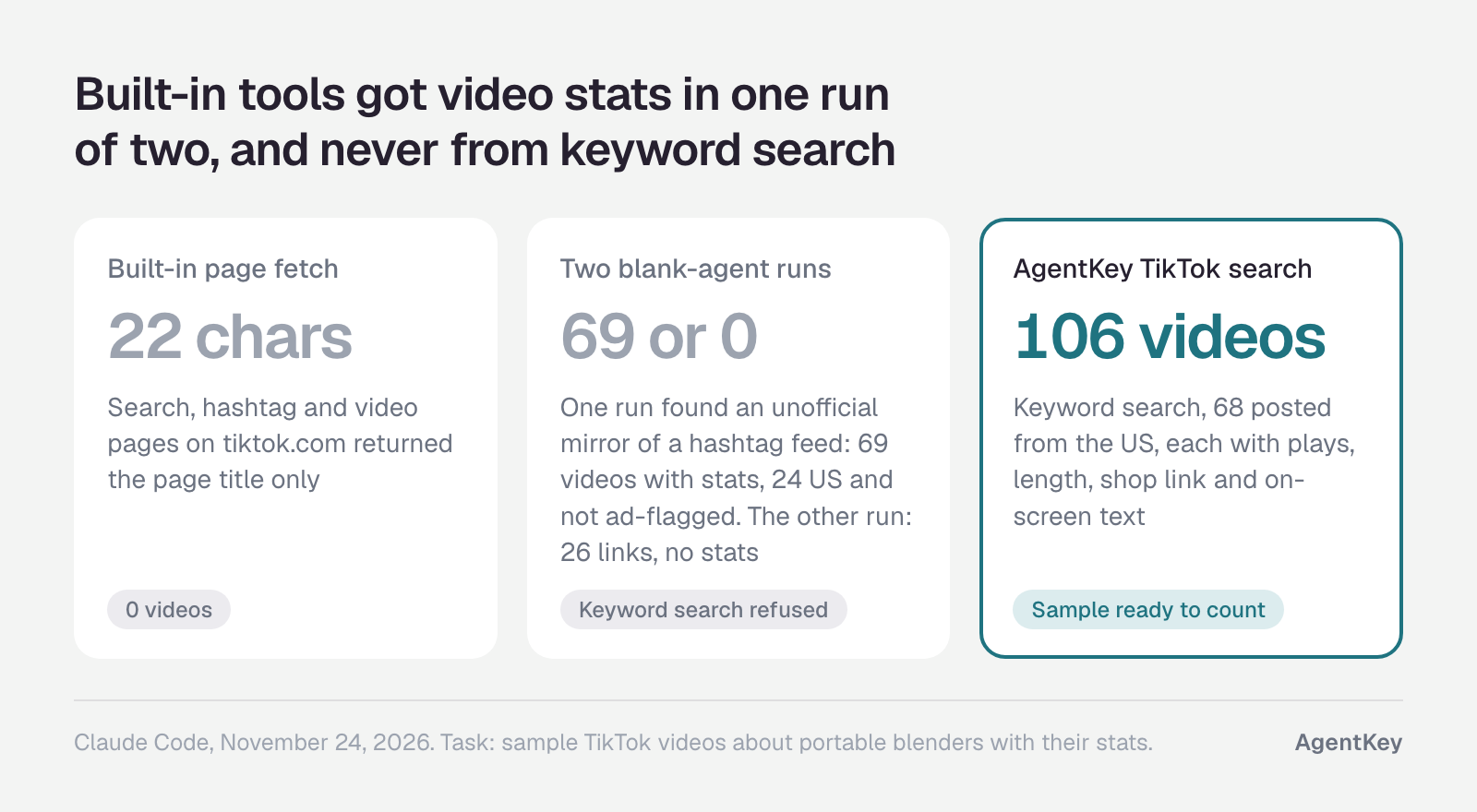
So built-in tools can be enough for a rough look at one hashtag, if you accept an unofficial source and a run that may not repeat. They did not give us keyword search, shop links or on-screen text.
Which AgentKey tools does this use?
One AgentKey TikTok tool does the reading, and finding it is free. Prices and capabilities were verified on November 24, 2026.
1. TikTok Video Search
Searches TikTok by keyword and returns the matching videos in the form TikTok's own app receives them. In the AgentKey catalog it is named TikHub/fetch_video_search_result_api_v1_tiktok_app_v3_fetch_video_search_result_get.
Pricing: 0.2 credits per call, a fixed price. Each of our seven calls returned 20 videos and was charged 0.2.
Features: keyword, region, count and offset, which this run used. The catalog also lists a sort type and a publish-time filter without saying what their values mean, so we left them alone. Each video comes back with its caption, plays, likes, shares, comments, saves, length, post date, the poster's region and follower count, any TikTok Shop product link, on-screen text stickers and TikTok's AI-generated label. The response is raw: about 1.7 MB per page, with creator names and avatars that we dropped.
2. Tool discovery and price check
Your agent finds a tool and sees its price before it spends anything.
Pricing: free.
Features: search the catalog in plain language, see each tool's parameters and per-call cost, and check remaining credits.
The six calls in the steps below cost 1.2 credits. On the Lite plan, at $12.90 a month for 500 credits, that is about 3 cents.
Our whole run made seven paid calls for 1.4 credits; the seventh was a check on the region setting. A second agent ran the prompt and was also charged 1.2.
How to find the video formats that get watched, step by step
Connect AgentKey once, then run four steps.
Before you start
Install AgentKey with the one-line installer. It checks your machine for supported agents, adds AgentKey to each, and opens a browser window to sign in. A new account starts on the Free plan with no card.
curl -fsSL https://agentkey.app/install.sh | bashOther install methods, including the Claude Code plugin, are in the installation guide. The TikTok for Claude Code page shows what the connection gives you.
Then fix the sample before you look at data: one keyword, one country, six pages of 20 results.
Step 1. Pull six pages of search results
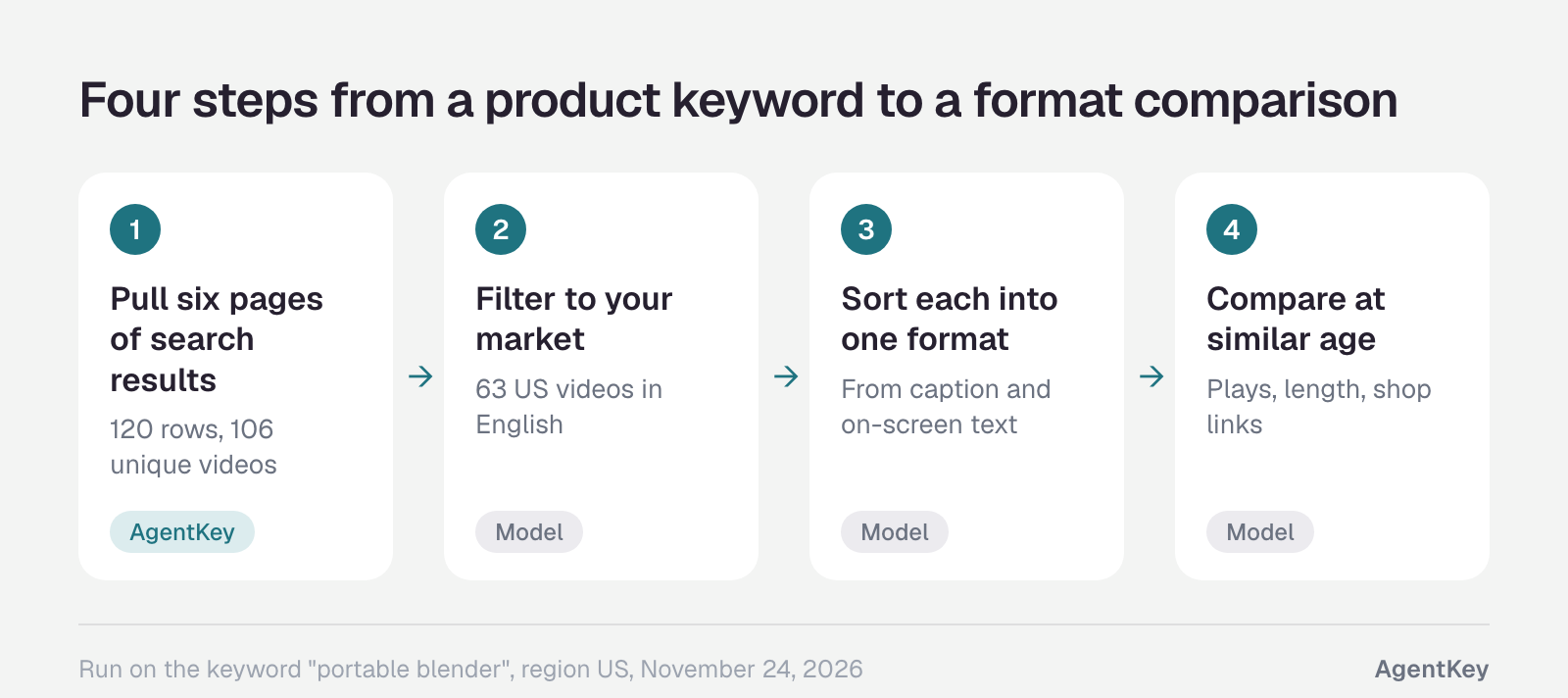
Ask for the same keyword and region six times, moving the offset by 20 each time. Six TikTok Video Search calls for "portable blender" with region US returned 120 rows for 1.2 credits.
The pages overlap. After removing repeats we had 106 unique videos, and the tool still reported more results after the sixth page.
Five of the 106 came back with plays, likes and shares at zero next to a real comment count. The tool marks these records, and we treated their numbers as missing.
Step 2. Filter to your market
The region setting steers the results; it does not filter them. With region US, 68 of the 106 videos were posted from the US, 16 from Great Britain, and the rest from ten other countries.
We checked that the setting matters with one extra call. With region GB, 8 of the first 20 results were posted from Great Britain, against 2 of 20 with region US.
We kept the US videos, dropped 2 with Spanish captions and 3 about other products, and had 63 videos from 58 accounts. Four of them had missing numbers, so plays are counted on 59.
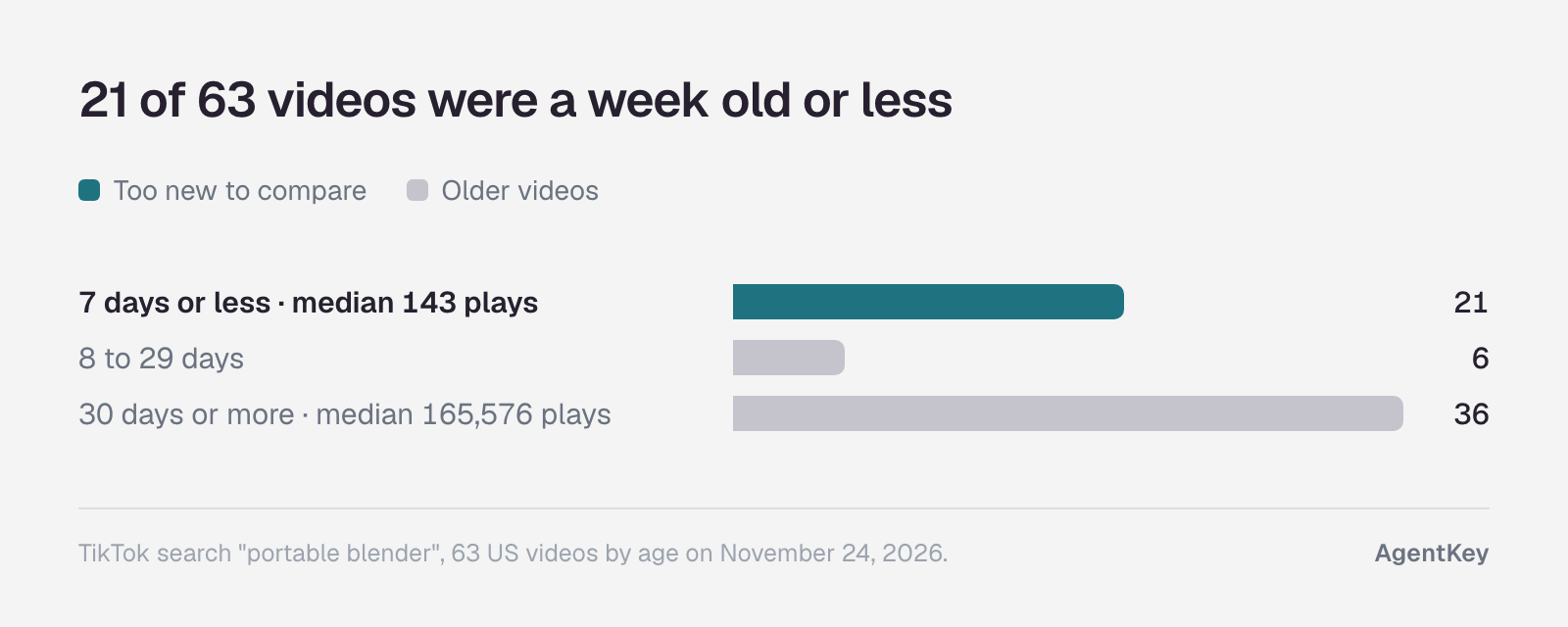
Then look at age, because search mixes old and new. 21 of the 63 videos were a week old or less, with a median of 143 plays. The 36 videos at least 30 days old had a median of 165,576, counted on the 34 with numbers.
Step 3. Sort each video into one format
This step is the model's work. It reads the caption and any on-screen text, which 20 of our 63 videos had, and gives each video one format.
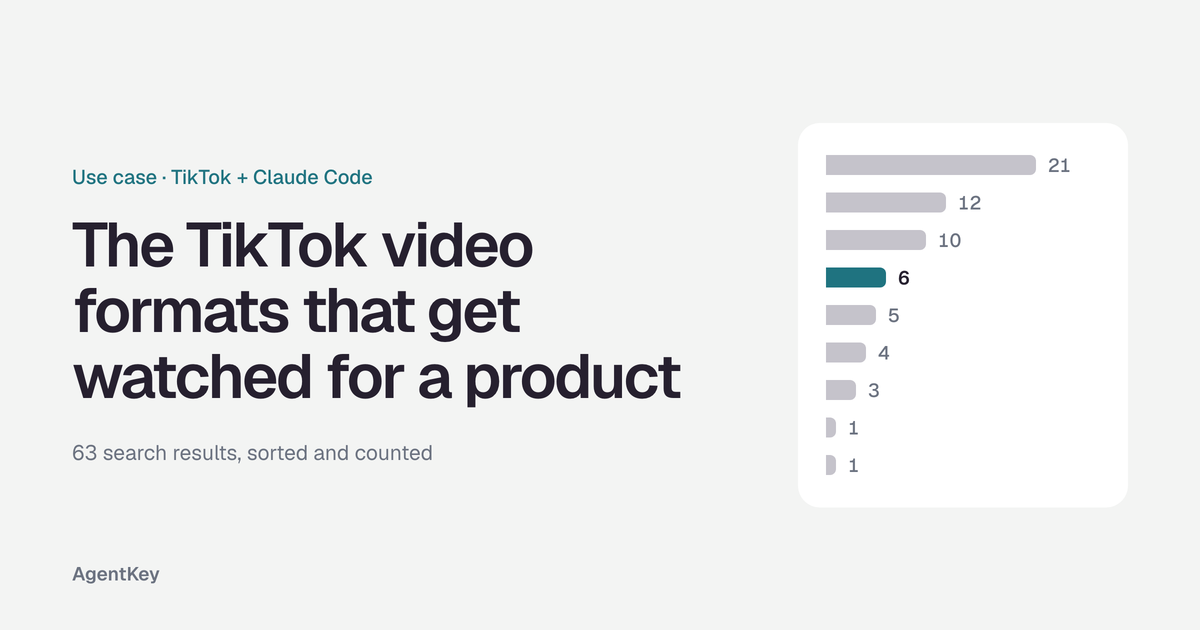
Feature pitches led with 21 videos: captions that list what the blender does. Then came personal reactions (12), deal or buy-now calls (10), recipe or make-with-me videos (6), and problem-and-fix videos (5). We found one unboxing and no comparison.
The common format was not the watched one. Recipe videos passed 1 million plays 4 times in 6. Feature pitches did it once in 21, and deal calls never did.
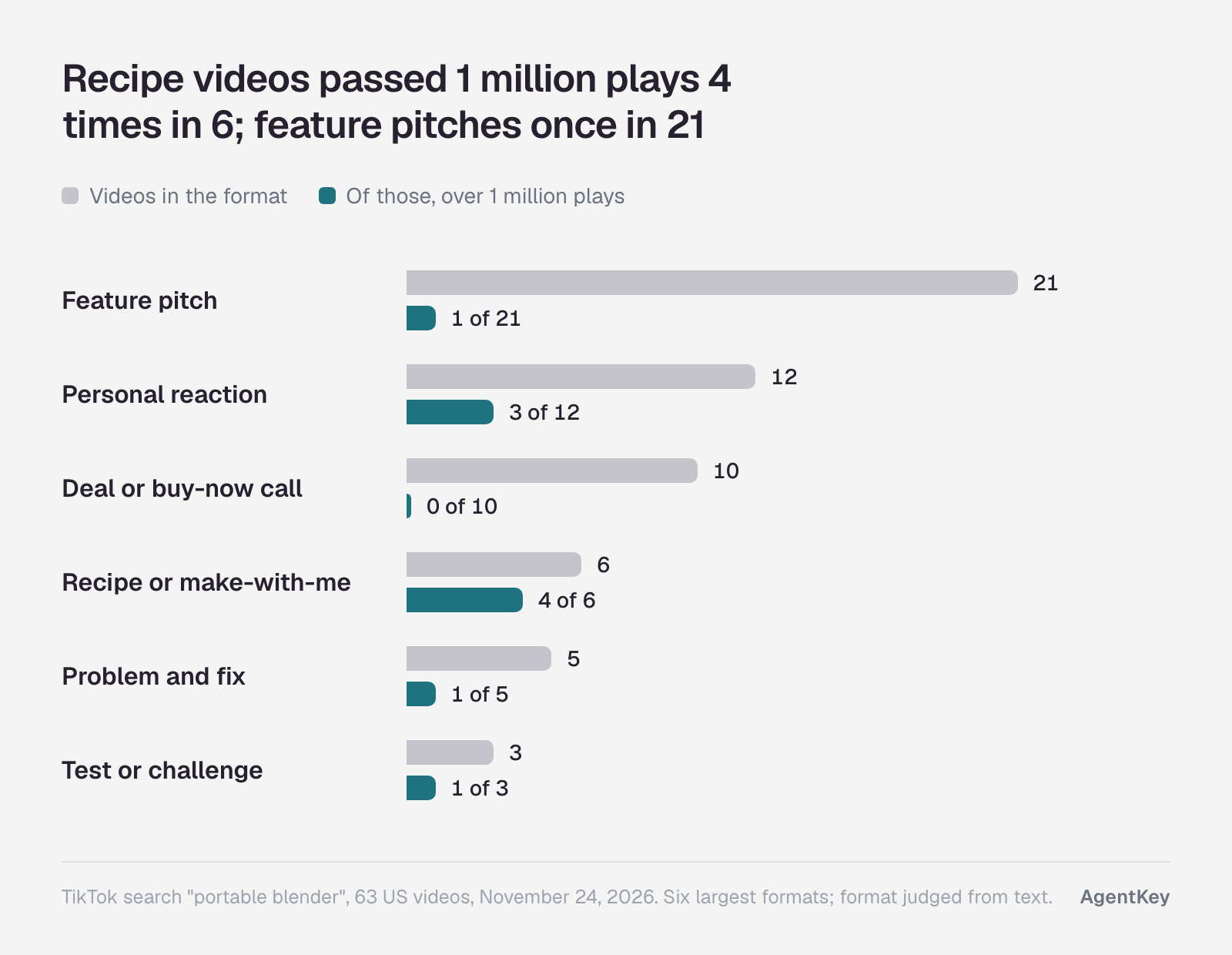
The two most-played videos, at 30.4 and 12.7 million plays, were both recipe videos from one account in the 100,000-plus follower band. Neither linked a shop product.
Step 4. Compare at similar age
Compare formats only among older videos. Of those at least 30 days old, 7 feature pitches had a median of 60,917 plays, 8 personal reactions 97,258, and 4 recipe videos 7.2 million.
Likes, shares and comments ran in the same order. The 4 older recipe videos had medians of 188,982 likes, 8,707 shares and 414 comments, against 218, 57 and 7 for the 7 feature pitches.
Length is short. 38 of the 63 videos ran under 30 seconds, and among the older ones, the 12 videos of 30 to 60 seconds had a higher median, 713,279 plays, than the 13 of 15 to 30 seconds, at 269,924.
Shop links are the closest this data gets to selling. 39 of the 63 videos linked a TikTok Shop product, and 18 of them linked the same listing, one with 13,445 reviews. The tool returns a listing's title and review count, and no sales figure.
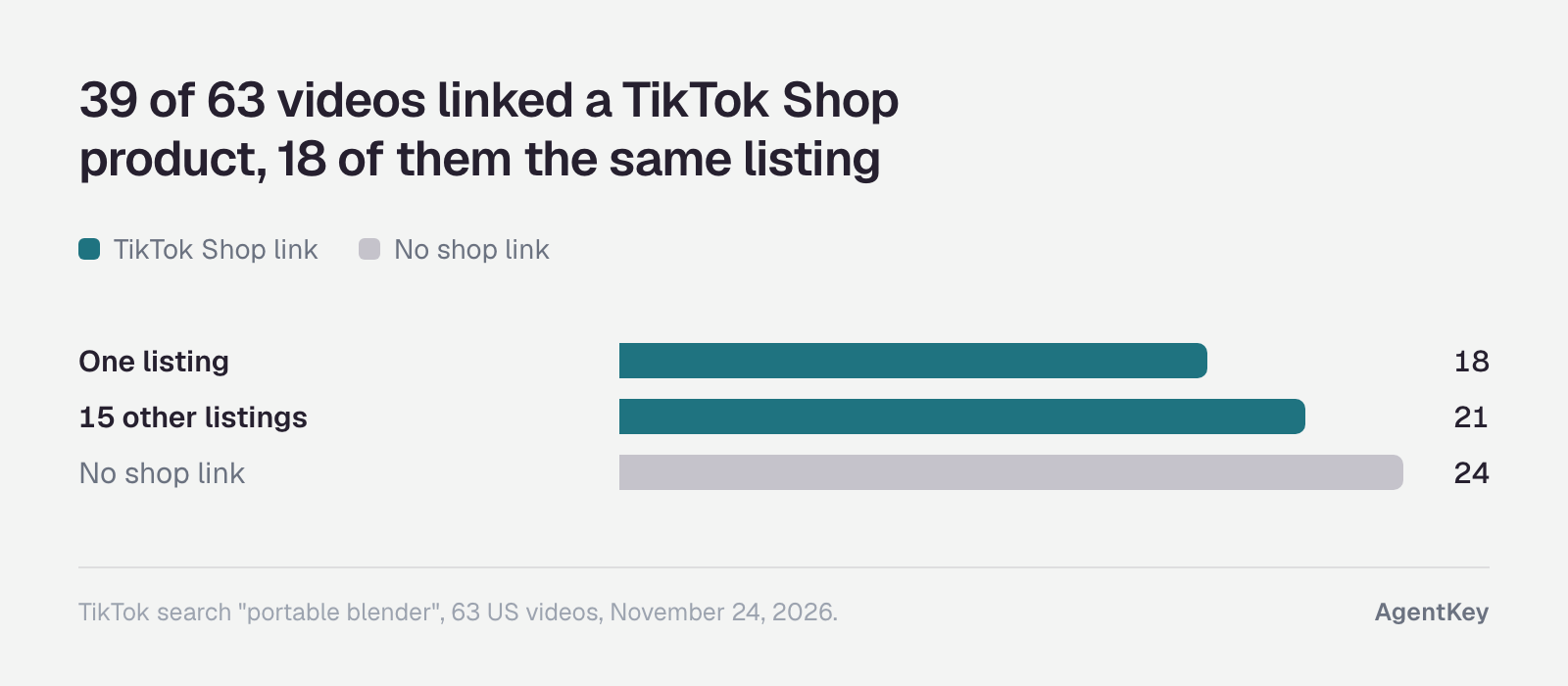
A shop link did not separate the older videos much: a median of 228,982 plays for 18 with one, and 140,513 for 16 without.
The ten most-played videos opened with a question about what to blend next, a wish to have owned one at an old office job, a line aimed at people who buy juice at the store, and a test against ginger. None opened with a price.
Our reading: for this product, showing a drink being made earned more views than listing features. That is an inference from 63 videos, and four of them carry most of it.
How do you check the results?
Recount a slice by hand, and look for the things that distort a search sample.
- Count what came back. 120 rows held 106 unique videos, so 14 rows were repeats.
- Read the region field. With region US, 38 of the 106 videos were posted elsewhere.
- Treat marked zeros as missing. Five videos showed 0 plays beside real comment counts.
- Compare like with like on age. The whole sample's median was 4,032 plays; for videos at least 30 days old it was 165,576.
- Expect the labels to move. A second agent ran the prompt on "portable blenders", plural, and kept 60 US videos. It found feature pitches most common, at 23, and recipe videos highest, at a median of 1.1 million plays across 4.
- Mind big accounts and small groups. Five videos made 79% of all plays, and the 5 videos from accounts above 100,000 followers had a median of 8.7 million. A format with three videos cannot be ranked.
- Do not read plays as sales. No field in the response counts orders.
When should you use something else?
Use a different route when you need sales, your own account's numbers, or what is said inside the videos.
If you need orders and revenue, they sit in TikTok Shop's seller and affiliate reports for your own products. If the videos are yours, TikTok's own analytics adds watch time and retention, which this tool does not return.
If a rough look at one hashtag is enough, your agent's built-in tools may do it. One of our two unprompted runs got 69 videos that way, from an unofficial source.
If the format depends on what the creator says, you need transcripts. The catalog lists a TikTok transcript tool from 0.3 credits per video; we did not call it, and formats here come from text on and under the video.
This is the AgentKey blog, and AgentKey provides the tools described here. They return search results. They do not watch videos, measure sales or tell you what to film.
Which tool should you use for each job?
Pick the tool from the question you are asking. Prices were verified on November 24, 2026.
- Sample the search results for a product keyword: TikTok Video Search. 0.2 credits per page of 20 videos.
- Read what is said in one video: AnyAPI/tiktok_video_transcript, listed from 0.3 credits per video. Not used in this run.
- Look up one video by its link: AnyAPI/tiktok_video, listed from 0.1 credits. Not used in this run.
- Check a price before spending: tool discovery and inspection. Free.
Conclusion
You now have a way to turn a product keyword into a counted list of video formats, with plays compared among videos of similar age. Filter by the region field, set new uploads aside, and recount a slice before you plan a shoot from it.
Connect TikTok to your agent through AgentKey →
FAQ
Can Claude Code read TikTok search results without AgentKey?
Not in our test. On November 24, 2026, its page fetch returned 22 characters from every TikTok page we tried. One of two unprompted runs did reach 69 hashtag videos with stats through an unofficial mirror, and the other reached none.
Does this show which videos sell a product?
No. It shows plays, likes, shares, comments and whether a video links a TikTok Shop product. The response has no order or revenue field.
Do I need to write code?
No. Your agent writes a short script on its own to read each 1.7 MB response, and you ask in plain language.
How much does it cost to analyze one keyword?
The six calls in the steps cost 1.2 credits, about 3 cents on the Lite plan. A second run of the prompt cost the same.
How many videos can I pull?
Each call returned 20 videos. Six calls gave 106 unique videos, and the tool reported more after that; we did not test how far it goes.
Does AgentKey decide a video's format?
No. AgentKey returns the search results. Your agent's model labels each video from its caption and on-screen text, so recount a slice by hand.
Which agents can run this?
We ran it in Claude Code only. AgentKey lists setup steps for other clients such as Cursor, Codex and ChatGPT on its supported agents page.
Is there a free way to try it?
A new account starts on the Free plan, which includes complimentary credits and needs no card. Finding and inspecting tools does not use credits.