How to Build a Competitor Battlecard From G2 Reviews With AgentKey
Connect G2 to your AI agent with AgentKey, pull the newest reviews of two or three competitors, and count the complaints and the praise. Steps, tool, prices and the prompt.
Turn real G2 reviews of your competitors into a counted battlecard: what reviewers complain about, what they praise, and where the products differ. Connect AgentKey, then paste this into your agent:
Use AgentKey's G2 reviews tool to build a competitor battlecard from G2 reviews of these products: [SLUG-1], [SLUG-2], [SLUG-3] (the product slugs from their G2 URLs). Read the tool's description for its price at limit 50 before any paid call, tell me the expected total, and stop if it would pass 3 credits. If a call times out, retry it up to three times.

For each product, pull the 50 newest reviews in one call: limit 50, sorted by recent, with fields set to id, createdUtc, rating, likes, dislikes, marketSegment, reviewSource, url. Check that every review URL contains the product slug and that the dates run roughly from newest to oldest; if they do not, tell me before you go on. Report how many reviews came back for each product against the 50 requested, the dates they cover and how many came from each review source.

Give each review's dislikes text exactly one complaint theme and its likes text exactly one praise theme, using the point the text leads with. Create the themes from the data and use the same themes for every product. "Nothing, but X" counts as X; a blank field or a plain "nothing" goes into a separate theme for no complaint named. Report the count of each theme per product, the themes where the products differ most, and up to three paraphrased examples for each of those.

Then make one more call for [SLUG-1] with the same limit and fields, sorted by lowest. It may return fewer than 50 reviews. Tell me how many came back, their ratings and dates, sort them into the same complaint themes, and say which themes take a larger share there than in its newest reviews. Paraphrase every review, leave out reviewer names, job titles and employers, and separate what the data shows from what you infer.
Salespeople and product marketers often build battlecards from memory: a lost deal, a rumor, a competitor's pricing page. The buyers' own words are on G2, where every reviewer answers what they like and what they dislike. Reading a few hundred of those answers for each competitor is the part nobody gets to.
An AI agent can do the reading and the counting, with one catch: in our test it could not open G2 on its own. This guide shows how AgentKey supplies the reviews and how to turn them into a counted card. We ran every step on three project management tools on November 24, 2026, and the numbers below come from that run.
We call the products A, B and C. The counts describe a small sample, and the method is what carries over to your category.
AgentKey covers one part of the job. It returns the reviews; your agent's model sorts them, and you check the result.
At the end you will have:
- A count of complaint themes for each competitor.
- A count of praise themes, so you know what not to attack.
- A second view from one competitor's lowest-rated reviews.
- A record of the dates, the review sources, the sample size and the cost.
Why can't an AI agent read G2 reviews on its own?
In our test, the agent's page fetch was refused and its web search returned snippets, not a sample. A battlecard count needs the same number of dated reviews for each product, each with its rating and its full likes and dislikes text.
We asked Claude Code to get that with its built-in tools first. It requested four g2.com pages: two review pages, a category page and a comparison page. Each request came back as HTTP 403 Forbidden.
The web search did reach G2. Four searches returned 45 links, all on G2's own sites, with summaries built from snippets of the pages.
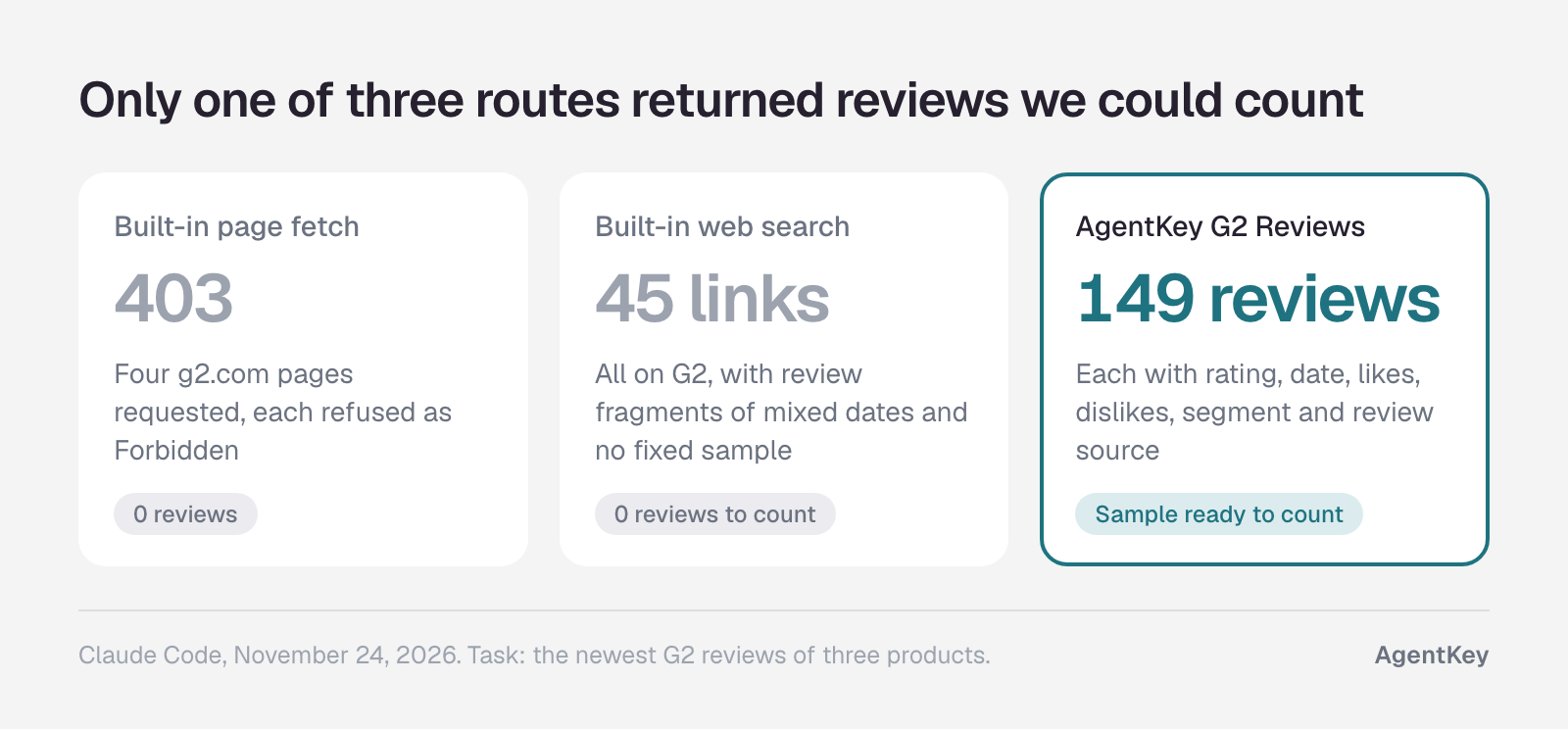
The snippets held sentences from reviews between a few days and nearly two years old. They also carried G2's own all-time theme tallies for two of the three products, and none for the third.
That is enough for an anecdote, and it cannot be counted. Nothing says which reviews the snippets came from or how many were left out, so two products cannot be compared on them. The other route is G2's own data products, which we did not test.
Which AgentKey tools does this use?
One tool does the reading, and the tools for finding it are free. Prices and capabilities were verified on November 24, 2026.
1. G2 Reviews
Returns the reviews of one product, given its G2 slug or URL. In the AgentKey catalog it is named AnyAPI/g2_reviews.
Pricing: from 0.1 credits per call, billed per review returned. The tool's description quotes 0.6 credits for 50 reviews. In our run, three calls that returned 49 or 50 reviews were charged 0.6 each, and one that returned 28 was charged 0.4.
Features: 50 to 100 reviews per call; sort by recent, helpful, highest, lowest or G2's default order, of which we used recent and lowest. Each review comes back with its star rating, date, title, link, likes text, dislikes text, problems solved, market segment and a review source label.
The limit is a maximum. Our requests for 50 returned 50, 49 and 50 newest reviews, and 28 when sorted by lowest.
2. Tool discovery and price check
Your agent finds a tool, reads its parameters and sees its price before it spends anything. The same goes for checking your balance.
Pricing: free.
Features: search the catalog in plain language; see each tool's parameters and per-call cost; check remaining credits.
The four calls in the steps below returned 177 reviews for 2.2 credits in total. On the Lite plan, which is $12.90 a month for 500 credits, that is about 6 cents.
The catalog has no tool that lists the products in a G2 category or searches G2 by name. You bring the product slugs, which are the last part of each product's G2 URL.
How to build a competitor battlecard, step by step
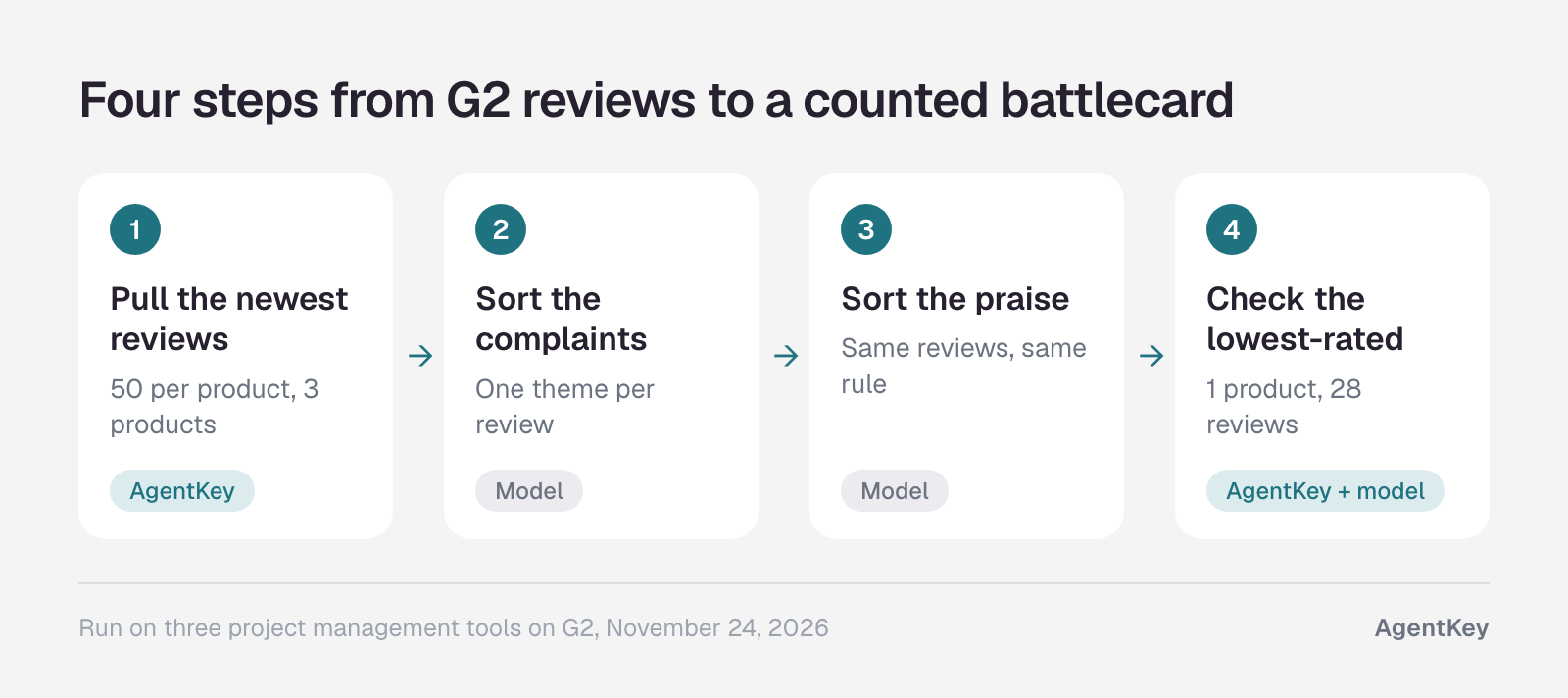
Connect AgentKey once, then run four steps: pull the newest reviews, sort the complaints, sort the praise, and check the lowest-rated reviews.
Before you start
Install AgentKey with the one-line installer. It finds the agents on your machine, adds AgentKey to each, and opens a browser tab to sign in. A new account starts on the Free plan with no card.
curl -fsSL https://agentkey.app/install.sh | bashOther install methods, including the Claude Code plugin, are in the installation guide. The G2 for Claude Code page shows what the connection gives you.
Then choose two or three competitors and fix the sample before you look at any data. We chose the 50 newest reviews of each product, which is also the smallest request the tool accepts.
Step 1. Pull the 50 newest reviews of each product
Ask for the newest reviews, one call per product, and name the fields you want back. The fields setting trims the response and does not change the price.
Your agent calls G2 Reviews with limit 50, sorted by recent. Three calls cost 1.8 credits and returned 149 reviews dated November 2 to 23: 50, 49 and 50.
Look at the lists before you count. Product A's 50 reviews covered four days, November 20 to 23, while the other two lists reached back three weeks. The dates ran from newest to oldest with a few entries out of place.
Step 2. Sort every complaint into one theme
This step is the model's work. Each review gets one complaint theme, taken from the point its dislikes text leads with, and the themes are the same for every product.
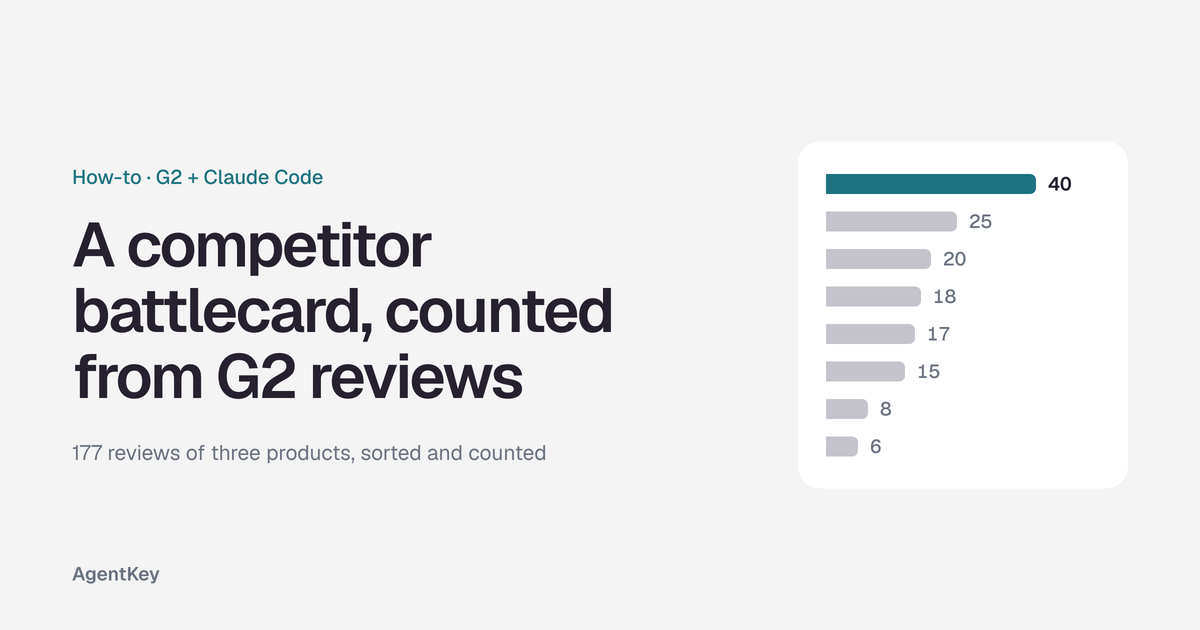
The largest theme was hard to learn or set up, with 40 of 149 reviews. Product A had 21 of its 50 reviews there, Product B 10 of 49 and Product C 9 of 50.
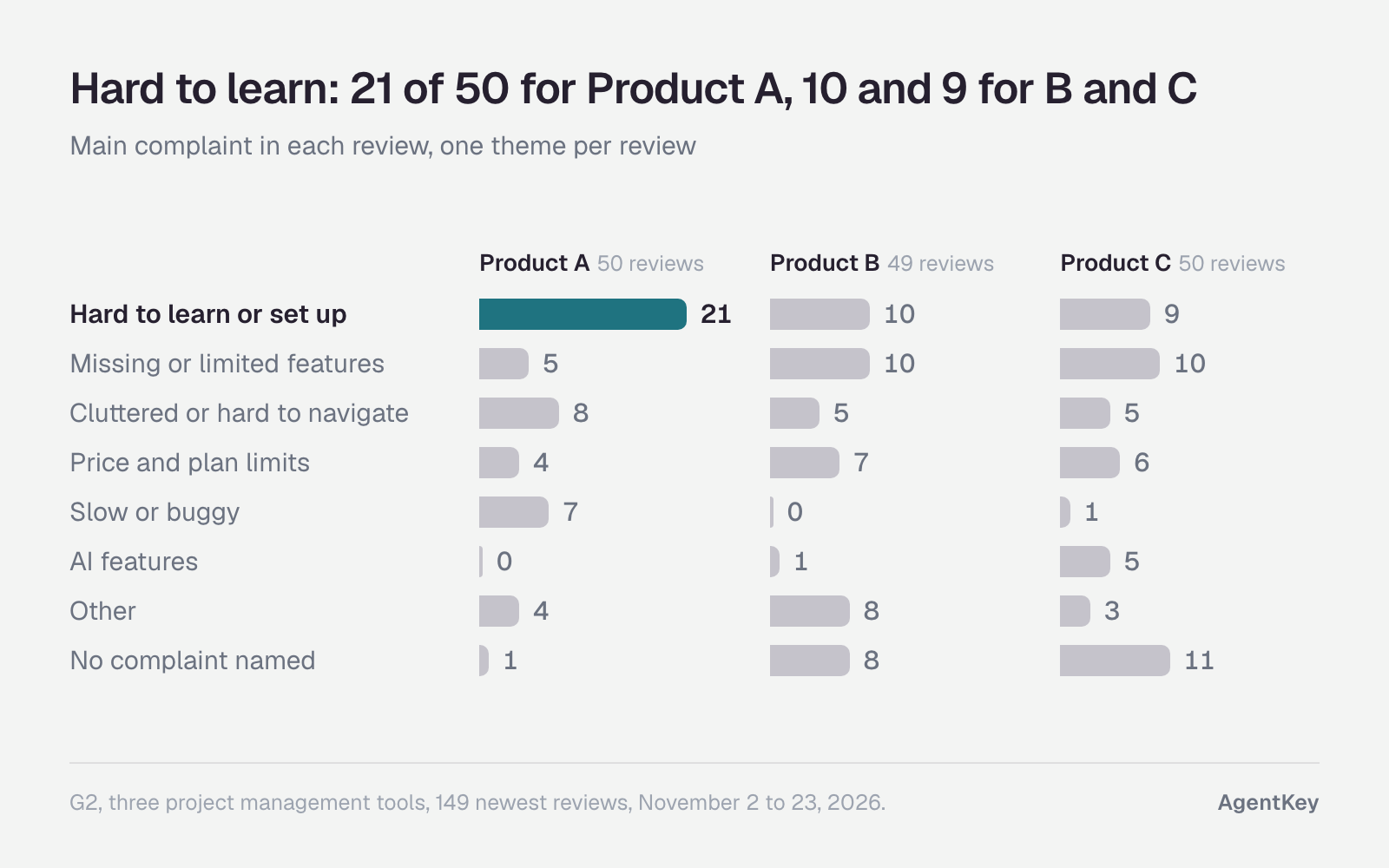
The full count, in the order A, B, C:
- Hard to learn or set up: 21, 10, 9.
- Missing or limited features: 5, 10, 10, or 25 in total.
- Cluttered or hard to navigate: 8, 5, 5, or 18.
- Price and plan limits: 4, 7, 6, or 17.
- Slow or buggy: 7, 0, 1, or 8.
- AI features: 0, 1, 5, or 6.
- Other: 4, 8, 3, or 15.
- No complaint named: 1, 8, 11, or 20.
Step 3. Sort the praise the same way
A battlecard also needs what the competitor's users like, because an attack on a loved feature falls flat. Run the same rule on the likes text.
Product A's reviewers led with flexibility in 17 of 50 reviews, against 8 of 49 for Product B and 6 of 50 for Product C. Ease of use ran the other way: 8 for A, 16 for B and 14 for C.
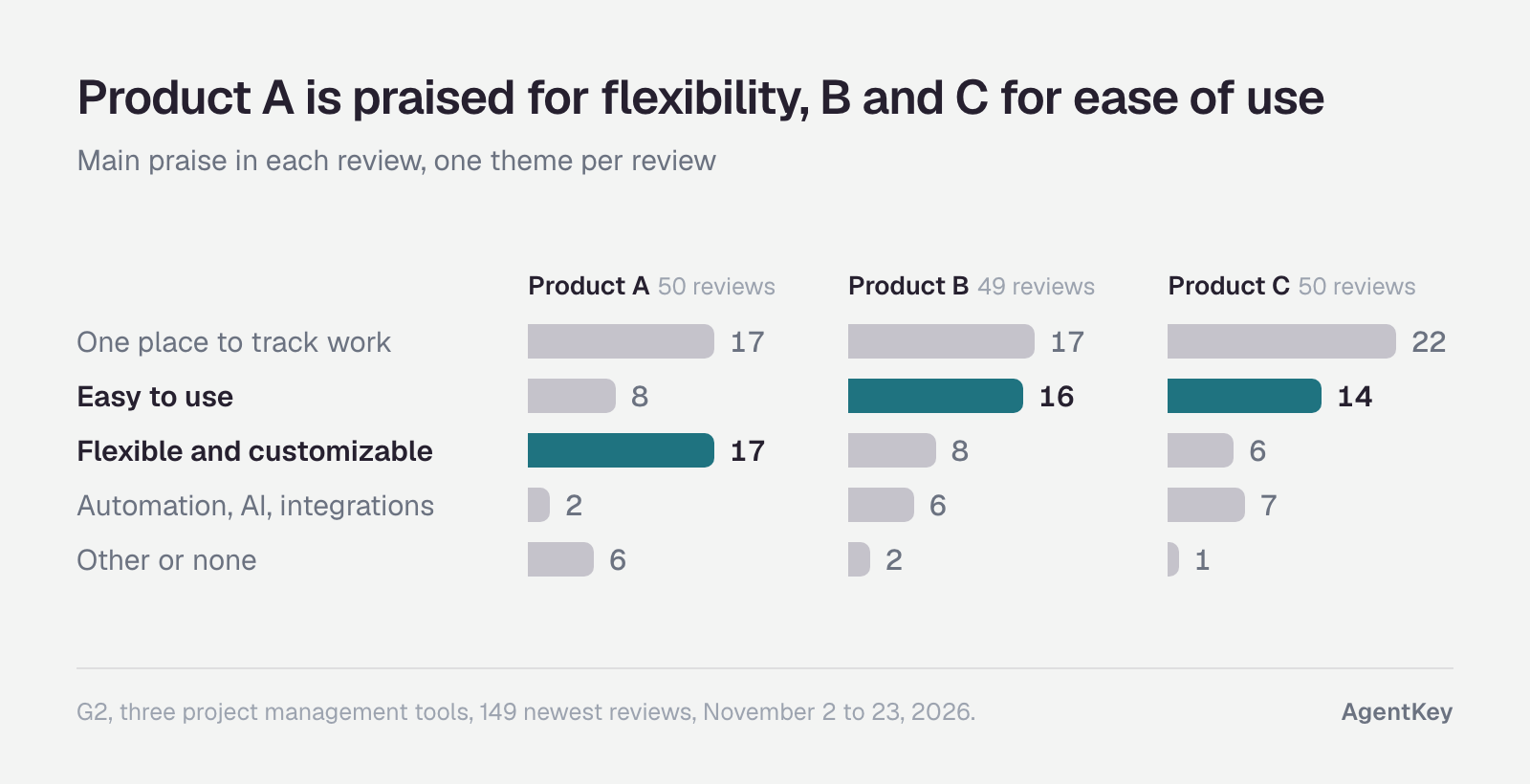
All three were praised most often as one place to track work: 17, 17 and 22. Automation, AI or integrations led 2, 6 and 7 reviews, and 6, 2 and 1 fell under other or none.
Our reading is that Product A's strength and its main complaint are the same trait. A card against it should concede the flexibility and ask who will do the setup.
Step 4. Check the lowest-rated reviews of one competitor
Newest reviews come mostly from satisfied users, so read the other end for the competitor you meet most. Call G2 Reviews again, sorted by lowest.
For Product A the call returned 28 reviews, all rated one star or lower, dated September 2022 to November 2026, for 0.4 credits. We asked for 50, and the response gave no reason for the shorter list.
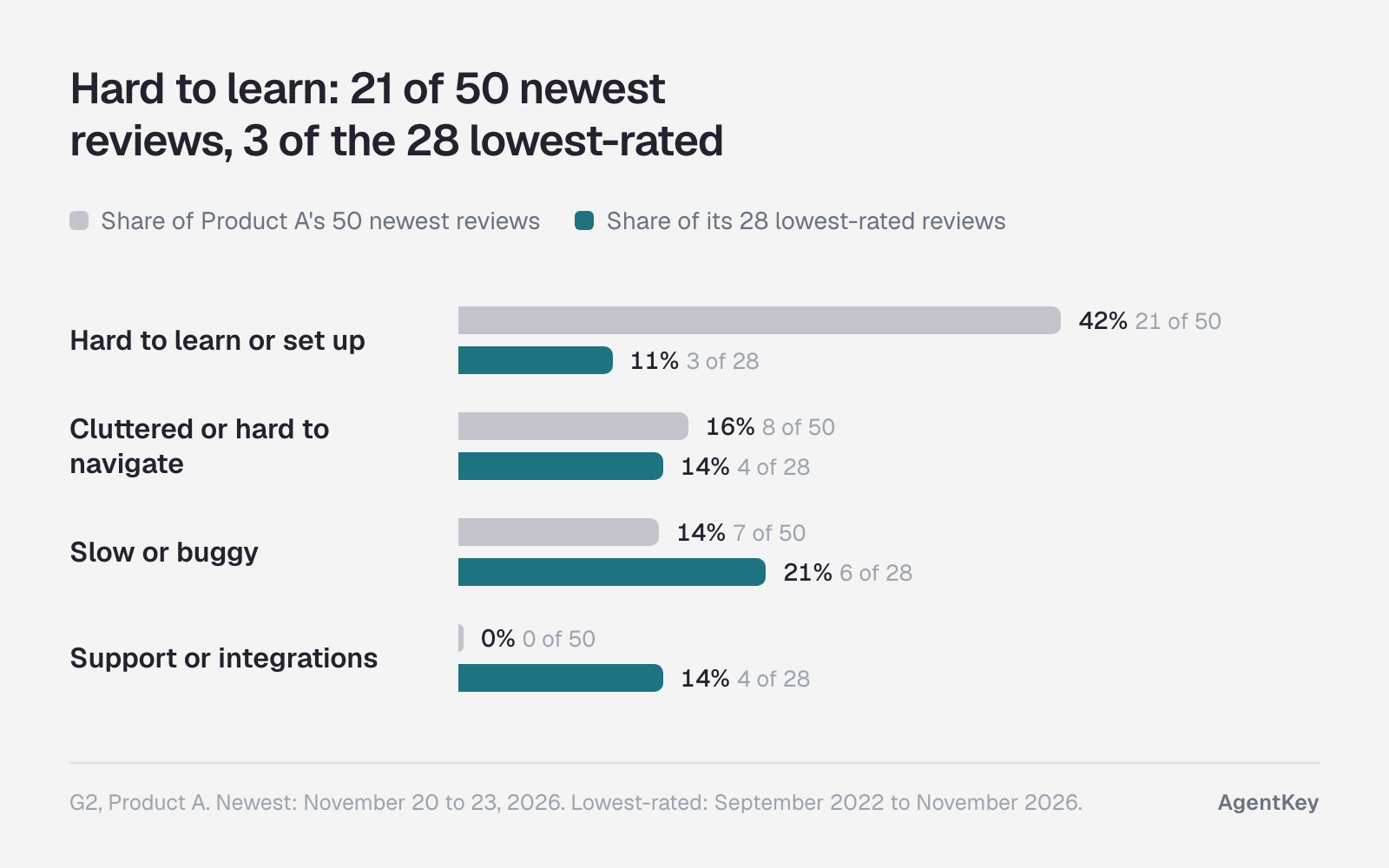
Hard to learn or set up fell from 21 of 50 (42%) to 3 of 28 (11%). Slow or buggy rose from 7 of 50 (14%) to 6 of 28 (21%), and support or integrations led 4 of 28 (14%) against 0 of 50 (0%). Cluttered or hard to navigate barely moved, at 8 of 50 (16%) and 4 of 28 (14%).
We added this step after seeing how positive the newest reviews were. With 28 reviews spread over four years, treat it as a list of questions to ask on calls.
How do you check the results?
Recount a slice by hand, and look at who wrote the reviews before you trust the counts.
- Look at the review source. 118 of the 149 newest reviews carried the source label vendor_self, and 24 were labeled organic. The tool does not define the labels; we read vendor_self as a review the vendor asked for, and did not confirm that with G2.
- Look at the ratings. 110 of the 149 were rated 4.5 stars or higher and 10 were below 4. These are complaints from people who like the product.
- Compare the date ranges. Product A's list covered four days and held no organic reviews, so the three lists are not like for like.
- Watch for repeated wording. Nine of Product A's 50 reviews used the same two labels, "pricing / ROI" and "support / onboarding", in their dislikes text. We cannot say why, and we counted them like any other review.
- Read the low ratings. At least four of the 28 lowest-rated reviews had mild or mostly positive text.
- Open ten reviews in one theme. If more than two are mislabeled, tighten the definitions and sort again. A second agent given the first version of our prompt matched our counts for slow or buggy and for price, and differed by up to four reviews per product elsewhere.
- Mind the sample. Fifty reviews per product support the top two or three themes, not the gap between 5 and 7.
When should you use something else?
Use a different route when the question is bigger than one counted read of recent reviews.
If you need every review of a product, or G2's category rankings and market reports, go to G2. The tool we used returns at most 100 reviews per call and its parameters include no paging option. We did not test G2's own data products.
If you need to know why you lose deals, ask the buyers. Win and loss interviews and your own call notes cover prospects who never wrote a review. For continuous tracking with alerts, a review monitoring product is built for that, and we did not test scheduled runs with AgentKey.
This is the AgentKey blog, and AgentKey provides the tools described here. They return reviews. They do not sort them, judge them or write your battlecard.
Which tool should you use for each job?
Pick the call from the question you are asking. Prices were verified on November 24, 2026.
- Count what current users complain about and praise: G2 Reviews, sorted by recent, limit 50. 0.6 credits per product in our run.
- Hear from unhappy reviewers: G2 Reviews, sorted by lowest. 0.4 credits for 28 reviews in our run.
- Check a price before spending: tool discovery and inspection. Free.
Conclusion
You now have a way to count what reviewers complain about and praise for each competitor, plus a second view from the lowest-rated reviews. Run it on your own competitors, and reread the reviews behind a claim before it goes on a slide.
Connect G2 to your agent through AgentKey →
FAQ
Can Claude Code read G2 reviews without AgentKey?
Not as a sample you can count, in our test. On November 24, 2026, its page fetch got HTTP 403 on four g2.com pages, and its web search returned links and snippets. Other agents may have different built-in access.
Do I need to write code?
No. You install AgentKey with one command and then ask your agent in plain language. The agent finds the tool, checks its parameters and runs it.
How much does a three-product battlecard cost?
Our run cost 2.2 credits for 177 reviews, about 6 cents on the Lite plan. Each extra product added 0.6 credits for its 50 newest reviews.
How many reviews can I pull at once?
Between 50 and 100 per call. The tool's parameters include no paging option, so one sort order reaches 100 reviews at most. We tested limit 50 only.
Can AgentKey list the products in a G2 category?
Not on November 24, 2026. The catalog had one G2 tool, and it takes a product slug. Choose the competitors yourself and copy each slug from its G2 URL.
Does AgentKey sort the reviews into themes?
No. AgentKey returns the reviews. Your agent's model does the sorting and the summary, which is why the prompt asks for examples you can check.
Which agents can run this?
We ran it in Claude Code. AgentKey also lists setup steps for other clients such as Cursor, Codex and ChatGPT on its supported agents page. We tested Claude Code only.
Is there a free way to try it?
A new account starts on the Free plan, which includes complimentary credits and needs no card. Finding and inspecting tools does not use credits, so you can check a tool's price before any paid call.